



Overall setup was fairly easy. I'm having some trouble getting things correct with the software but I suspect it's user error.


BLACK FRIDAY · SAVE $100
Everblog 21.5" HomeCal™ Digital Family Calendar
HomeCal™ is a 21.5" digital family calendar that brings your family's schedules, chores, meals and grocery lists into one shared view, at home and on the go. Track what's in your fridge to reduce food waste, lighten Mom's mental load, and help kids stay on track, with no monthly subscription required.
- 21.5" Full HD Touchscreen
- Syncs with Google, Apple iCloud, Outlook, Yahoo, Cozi & TeamSnap
- Chores & Rewards
- Meal Planning & Grocery Lists
- No Monthly Subscription
BLACK FRIDAY SPECIAL
$299
$399
SAVE $100
LIMITED TIME ONLY
Select Option:
- 2-Year Warranty
- 180-Day Free Return
- Free US Shipping

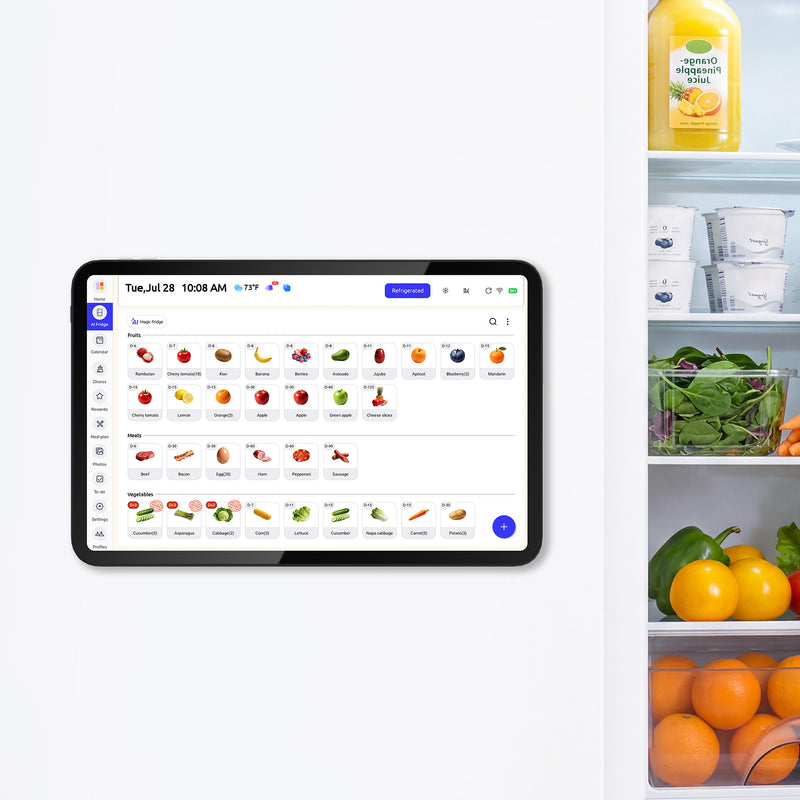
- Smart Fridge Manager– Track your food easily, get gentle reminders before items expire, reduce waste, save money, and keep meals safe and fresh.
- Calendar Auto-Sync– Seamlessly sync your family calendar with Google or Outlook for effortless day, week, and month planning.
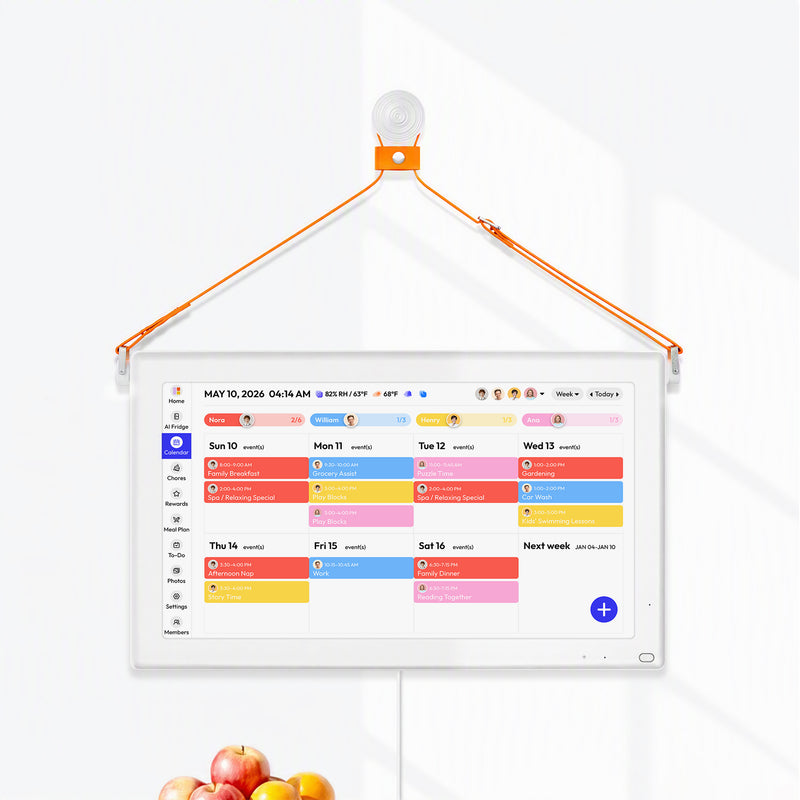
- Member Color Coding– Assign each family member a unique color to track tasks and progress at a glance.
- Chore Chart– Kids complete chores via an interactive checklist, making responsibility fun and easy to track.
- Rewards System– Set goals, reward progress with gifts and animated emojis, turning tasks into proud moments.
- Meal Planner– Plan your week, discover fresh recipes, and create balanced meals with no last-minute stress.
- Entertainment Hub– Access millions of apps for learning, games, and family entertainment.
- Family Calendar App– Update events or tasks on the go; changes sync instantly across the family calendar.
- Calendar Views– Switch between day, week, or month views for a clear overview of family activities and tasks.
- Custom Lists– Create task and grocery lists to stay organized and simplify shopping and chores.
- Weather & Countdown– Check real-time weather and track events with countdowns so nothing is missed.
- Screensaver Mode– Display favorite photos when idle, adding warmth and a personal touch to your home.
- Sleep Mode– Automatically enters sleep mode when unused, saving energy and extending device life.
• Screen: 21.5" Touchscreen (16:9)
• Resolution: 1920×1080 FHD
• Size: 21.4 × 12.7 × 1.3 inches
• Weight: 13.7 lbs
• Storage: 64GB
• Sound: 20W Quad Speakers
• Indicator Light: Multi-color LED
• Power Input: AC Port
• Power Supply: Built-in 12V / 4A
• Wi-Fi: 2.4GHz / 5GHz
• Certificates: CE, FCC, RoHS, MSDS, UN38.3
• 21.5" Digital Calendar ×1
• Power Adapter ×1
• Hanging Strap ×1
• Accessories Pack ×1
• User Manual ×1
• Sticker Sheet ×1
• Positioning Paper ×1
Auto-Syncs With
 Google
 Outlook
 Apple
 TeamSnap
 Cozi
 Yahoo
Everblog 21.5" HomeCal™ Digital Family Calendar
Sale price$299.00
Regular price$399.00
MEET YOUR HOME’S NEW COMMAND CENTER.
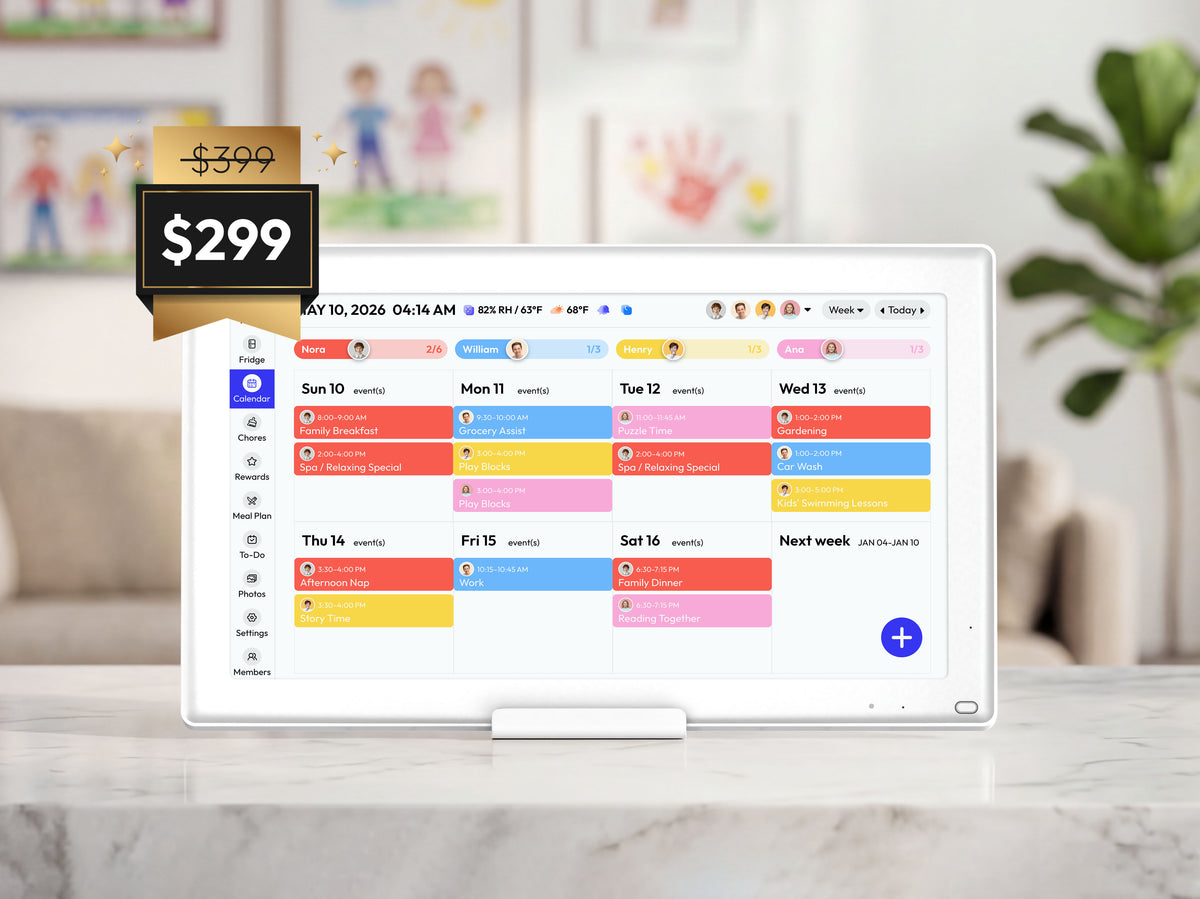
Need one place to check the week without chasing messages or opening five different apps? HomeCal is a digital family calendar that brings shared schedules, chore charts, meal plans and to-do lists onto one screen your whole family can see at a glance.


CHAOS MANAGED. CLARITY FOUND.
Give your mental tabs a rest. HomeCal keeps your shared calendar, food inventory, meal plans and chores in one place, so the whole family knows exactly what's happening, when and where.

One House. One Schedule.
Sync every practice, appointment and school event from Google, Apple iCloud, Outlook and more into one view, so the whole family stays in sync.


Fresh Food. Zero Waste.
Keep a record of what's in your fridge, freezer and pantry, and see expiration dates at a glance, so you waste less and shop smarter.


Weekly Meals. Daily Ease.
Map out your week and end the "what's for dinner" fatigue. Plan weekly meals and keep your grocery list right alongside them.


Shared Tasks. Earned Rewards.
Schedule tasks at home and track every win. Assign chores, track progress and reward kids for finished tasks.

SYNC ONCE. SHARED ALWAYS.
Bring Google, iCal, Outlook, Yahoo, Cozi and TeamSnap calendars into one beautiful hub. Switch between day, week, month and schedule views to keep the whole family's rhythm perfectly in sight.

Google

iCal

Outlook

Yahoo

Cozi

TeamSnap


SMART REMINDERS. ORGANIZED LIFE.
Always on time, always in sync. Get reminders on HomeCal and your phone for school events, appointments, chores and daily routines.
Mobile Sync
Receive instant notifications on the go through the Everblog app, and stay connected to your home schedule from anywhere.

Pop-ups
On-screen reminders pop up on HomeCal before each event, so no one misses what's next.
Daily Routines
Set recurring morning and bedtime routines that repeat automatically.

Special Moments
Never miss birthdays, anniversaries and family celebrations.
Time Focus
Help your family stay on track with clear time blocks, focused plans, and fewer distractions.


GROW DUTY. GET REWARDED.
From tackling first chores to unlocking special treats, HomeCal's digital chore chart empowers kids to contribute while celebrating every achievement.
Set tasks empower kids
Assign chores instantly on the big screen. Clear lists give children a sense of ownership.

Do chores build habits
Kids track progress directly on the hub. Checking off tasks creates a satisfying achievement.
Earn points unlock joy
Kids earn Stars for completed chores and redeem them for rewards your family chooses. Turn every small win into a grand celebration of success.

EASY ADD. SMART INPUT.
Choose the method that fits your moment. Speak it, type it, snap a school notice or forward an email, then review the details and save. Your schedule stays updated and your family stays in sync.
AI Voice Input
Just say it, like "Soccer practice Tuesday at 5," on HomeCal or your phone, and AI adds it to your calendar.

Keyboard
Type events, chores and grocery items quickly with the on-screen keyboard.

Photo Scan
Snap a school flyer, sports schedule or appointment card, and HomeCal turns the details into calendar events for you to review.

Image Upload
Already have a screenshot or photo of an invite? Upload it from your gallery and turn it into an event.

Smart Sync
Connected Google, iCal, Outlook, Yahoo, Cozi and TeamSnap calendars update automatically, with no manual entry needed.

Email Forward
Forward school emails, booking confirmations or party invites to your family's dedicated HomeCal address, and the events are added for you.
AI Voice Input
Just say it, like "Soccer practice Tuesday at 5," on HomeCal or your phone, and AI adds it to your calendar.
Keyboard
Type events, chores and grocery items quickly with the on-screen keyboard.
Photo Scan
Snap a school flyer, sports schedule or appointment card, and HomeCal turns the details into calendar events for you to review.
Image Upload
Already have a screenshot or photo of an invite? Upload it from your gallery and turn it into an event.
Smart Sync
Connected Google, iCal, Outlook, Yahoo, Cozi and TeamSnap calendars update automatically, with no manual entry needed.
Email Forward
Forward school emails, booking confirmations or party invites to your family's dedicated HomeCal address, and the events are added for you.
WORK DONE. PLAY STARTS.
Built with Parental Lock—requested by parents like you—to easily restrict access to the Entertainment Center and any key feature.
Stream your favorite content on the 21.5" HomeCal™.


Linked App. Life Sync.
Take full control of your household from your pocket. Manage every schedule and task while you are on the move.

Instant sync

Push notifications

Family sharing


EASY SETUP. PERFECT FIT.
Choose the perfect way to display your hub: on a stand, on the wall, with rope hanging or in a wood frame. Install your device in minutes with simple tools and smart options.
Stand display
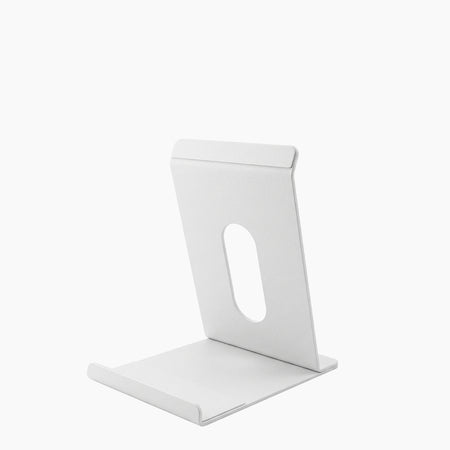
Place your calendar on any flat surface with a sturdy stand, making it easy to share schedules during family dinners.

Wall mount
Mount HomeCal on the wall with the included bracket for an always-visible family command center.
Hanging Strap
Hang HomeCal with a decorative rope for a no-drill, easy-to-move setup.

Frames
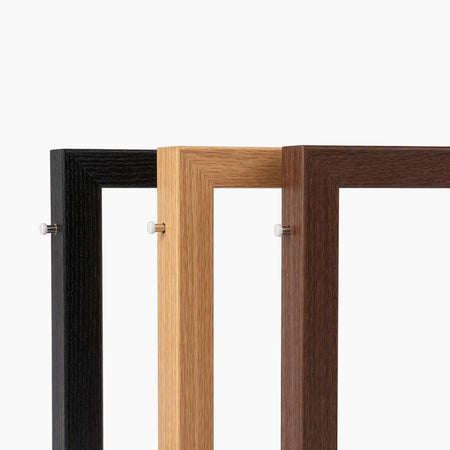
Add an oak, walnut or charcoal frame so HomeCal blends in like wall art.


What's in the Box?


FULL ACCESS. ZERO LIMITS.
No subscription. No monthly fees. Every HomeCal includes full access to the shared family calendar, chore chart, meal planner, food inventory, grocery lists and mobile app, today and always.

Calendar Auto-Sync
Keep everyone in sync with no missed plans or double bookings.

Rewards System
Track kids' progress and build better habits with simple rewards.

Entertainment Hub
Enjoy music and shows while you cook, turning daily chores into joyful moments.

Family Calendar App
Manage plans on the go and keep everyone in sync.

Meal Planner
No more “What’s for dinner?”—enjoy happier family evenings.

Chore Chart
Assign tasks, track progress, and simplify daily routines.

Screensaver
Enjoy your memories every time your screen lights up.

Sleep Mode
Automatically adjust sleep and wake times based on your schedule.

Over-the-air Updates
New features and improvements are delivered automatically.
FAQs
What is Everblog HomeCal, and what can I do with it?
Everblog HomeCal™ is a 21.5" digital family calendar that brings your synced calendars, chores and rewards, meal plans, grocery lists and food inventory into one shared touchscreen. Use it as your family command center at home, and manage everything on the go with the Everblog app.
Who is HomeCal best for?
HomeCal is built for busy families coordinating school, work, activities, chores and meals. It's ideal if you want one large, always-on display the whole family can check at a glance, on the wall, counter or desk.
How is HomeCal different from a paper calendar or a regular calendar app?
A paper calendar needs manual updates, and calendar apps keep plans on separate phones. HomeCal syncs your digital calendars automatically and puts schedules, chores, meal plans and grocery lists on one shared 21.5" screen, so everyone sees the same plan without asking.
Are there any subscription fees?
No. Every feature is included with no monthly subscription.
Can HomeCal sync with Google Calendar and other calendar services?
Yes. HomeCal syncs with Google Calendar, Apple iCloud (iCal), Outlook, Yahoo, Cozi and TeamSnap. Google Calendar and Outlook support two-way sync, so events you add or edit on HomeCal also update on your phone.
Does HomeCal include a digital chore chart with rewards?
Yes. Assign chores to each family member, track completion on the shared display, and let kids earn Stars they can redeem for rewards your family chooses.
Can I use HomeCal for weekly meal planning and grocery lists?
Yes. Plan meals for the week on HomeCal and add a recipe's ingredients to your grocery list with "Add Recipe to Grocery List" in the Everblog app. Your list syncs to your phone for shopping.
How does HomeCal help me keep track of food in the fridge?
With Smart Fridge Manager, record what's in your fridge, freezer and pantry, and see expiration dates at a glance so you know what to use first. Update the list as you shop and cook to waste less food.
Does the 21.5-inch HomeCal need to stay plugged in?
Yes. HomeCal is powered by an AC adapter for an always-on display, so place it within reach of an outlet. Looking for a cordless option for your fridge? See FridgeCal™.
Does HomeCal need Wi-Fi to sync calendars and use the app?
Yes. HomeCal connects to 2.4 GHz or 5 GHz Wi-Fi to sync calendars and the Everblog app. Events already on the screen stay visible if your connection drops.
What's the difference between HomeCal and FridgeCal?
HomeCal™ is a 21.5" digital family calendar for your wall, counter or desk, with an always-on display. FridgeCal™ is a 13.4" magnetic, cordless AI fridge calendar with FridgeMind™ AI for food tracking. Choose based on where your family gathers and the screen size you prefer.
Can I switch profiles easily for different family members?
Yes, quick profile switching keeps everyone’s schedules separate and organized.
What installation options are available?
The calendar can be wall-mounted using straps or nails — setup is simple, even for non-tech users.All you need is an outlet nearby and Wi-Fi. See our setup video for step-by-step help.
Is voice input supported?
Yes, voice input with dual microphones lets you add tasks hands-free — perfect when your hands are full.
Are there notification lights for different family members?
Color-coded breathing lights notify family members with subtle, intuitive alerts.
Does it include entertainment features?
Yes, it has built-in music and video apps with powerful speakers, so you can enjoy recipes or music while working.
Does it monitor indoor temperature and humidity?
Yes, sensors show real-time indoor climate info, helping keep your home comfortable.
How does cable management work?
The back panel has slots to route cables neatly, avoiding clutter and tangles.
CUSTOMER REVIEWS
Customer Reviews
Overall rating: 4.9 / 5 from 207 reviews.
I appreciate having our recipes and shopping plans organized together. It makes preparing dinner feel less overwhelming.
Everblog 21.5" HomeCal™ Digital Family Calendar
We now plan our meals based on what's already in the kitchen. It's a small habit that has made our grocery shopping more organized.
Easy set up
Everblog 21.5" HomeCal™ Digital Family Calendar
Great product and shipping.
Everblog 21.5" HomeCal™ Calendar
I love discovering new meal ideas instead of making the same three dinners over and over again.
The latest update looks so much better! The bigger color blocks make it super easy to see who's doing what. Such a nice improvement.
Everblog 21.5" HomeCal™ Calendar
Grocery shopping is much easier when I already know what recipes we're making and which ingredients we need.
The big screen is my favorite part. I can check our plans from across the room without grabbing my phone.
Our kitchen used to be full of sticky notes with grocery reminders and dinner ideas. Now we have one place to keep everything organized.
Really happy with the parental lock feature. My kids love exploring the screen, so having more control over what they can access is a big plus.
Everblog 21.5" HomeCal™ Calendar
Everblog has become part of our kitchen routine. From checking our grocery list to planning tomorrow's dinner, it's nice having everything in one place.
I like checking what we have before making another grocery run. It helps us use our ingredients more thoughtfully.
With three kids and a million activities, our schedule was always a mess. Now everyone can see what's coming up without asking me ten times a day. Honestly, it's been a lifesaver.
We have started preparing more meals at home because deciding what to cook is no longer such a daily struggle.
The chore icons are great for my little one. He doesn’t need to read to know what tasks he has to do.
Everblog 21.5" HomeCal™ Calendar

Separate family accounts are way better than sharing one login. My husband and I can both use it without fighting over access.
Everblog 21.5" HomeCal™ Calendar
Great product!
Everything we wanted from a digital calendar
It's helped us get into a better routine with meal planning, grocery shopping, and preparing food for the week.
Parental lock was a must-have for me. I want kids using it for schedules, not watching videos all day long.
I switch between day, week and month views as needed. The big screen makes all of them so much easier to use.
We've been using it daily and it's become part of our routine. The calendar, chores, and reminders are all super handy. I also love that there's no monthly subscription. Definitely happy we got it!
We have been trying to waste less food. Planning meals around ingredients we already have has been a great place to start.
My favorite part is having the whole week's meals planned ahead. Busy evenings are much less stressful when dinner is already figured out.
Meal planning used to feel like another chore. Now it's something the whole family can participate in.
We keep our grocery list updated throughout the week. Everyone can add things, so shopping is no longer just one person's responsibility.
Calendar is great! Only gripe is what seems to be a glitch when trying to sync my apple calendar. It blocks the box to type in.
Everblog 21.5" HomeCal™ Calendar
Having the grocery list right on the fridge is so convenient. We can add things as soon as we notice we're running low.
Had a little trouble getting everything set up at first. Reached out to support and they got back to me pretty quickly. Everything is working great now. Really appreciate the help!
I love being able to organize our weekly meals and family schedule together. Everything feels much more manageable.
Google Calendar sync was the main reason I wanted one. Once everything was connected, it became much easier to keep our family plans together.
I love the colander just wish it appeared bigger on the screen or can be adjusted.
Everblog 21.5" HomeCal™ Calendar
A simple but useful change to our daily routine. We spend less time figuring out what to cook and more time enjoying dinner together.

Between work, school events, appointments and practices, our schedule used to be everywhere. Now we finally have one place to check everything.
Everblog 21.5" HomeCal™ Calendar
Less guessing, fewer forgotten groceries, and much better weekly planning. Exactly what our busy household needed!
We check the calendar every morning before school. The kids know their chores, I know everyone's appointments, and my husband actually checks the schedule now 😂 Didn't think that would happen!

This has basically become our family command center. Calendar, chores and lists are all right there where everyone can see them.
Everblog 21.5" HomeCal™ Calendar
I love being able to walk past it and see the whole family schedule without opening my phone. The 21.5" screen makes a huge difference.
Love this product! It is already a staple in my house and the kids are super motivated to earn the rewards. The only negative was how it is hung on the wall.
Everblog 21.5" HomeCal™ Calendar
