








A co-parenting schedule app is a specialized tool built to help divorced or separated parents manage custody, share critical information, and actually communicate. These platforms are designed to pull you out of the endless, chaotic text threads and email chains, giving you a single, organized hub for everything—calendars, expenses, and secure messaging.
The whole point is to create a clear and accountable system for raising kids when you're living in two different homes.
Moving Beyond Chaotic Text Threads
Let's be real—trying to manage co-parenting logistics through a flurry of texts, phone calls, and random emails is a recipe for disaster. One simple question about a soccer pickup can spiral into a confusing, multi-platform mess. Before you know it, important details are buried, misunderstandings pop up, and the emotional baggage of every single interaction gets heavier.
This constant back-and-forth isn't just inefficient; it's a huge source of anxiety. You find yourself scrolling through old messages to prove a point, double-checking your calendar constantly, or getting blindsided by a last-minute change you never agreed to. It’s a reactive way to parent that leaves everyone feeling frustrated and perpetually on edge.
From Conflict to Clarity
This is where a dedicated co parenting schedule app can completely change the game. It lifts your family’s most important logistics out of those personal, emotionally charged communication channels and places them into a neutral, business-like platform.
Think of it as a shared digital headquarters for your co-parenting life.
This shift is fundamental to creating stability. Instead of relying on flawed memories or digging through messy inboxes, you get a single source of truth for:
- Custody Schedules: Clear, visual calendars showing parenting time, holidays, and special events. No more guessing whose weekend it is.
- Appointment Details: Doctor's visits, parent-teacher conferences, and extracurriculars are all logged in one central, accessible spot.
- Important Requests: Any requests for schedule changes are time-stamped and documented, which shuts down "he-said, she-said" arguments before they even start.
A central hub drastically reduces the mental load for both parents. The goal is to spend less energy bickering about logistics and more time focused on what truly matters: your kids' well-being.
Why You Need a Better System
The need for a better way is obvious when you look at the numbers. With 68% of co-parents saying that scheduling conflicts are their biggest source of friction, it's clear that an organized system isn't just nice to have—it's essential.
For many families, these apps are more than just a convenience. They're a lifeline. They move interactions from a place of conflict to one of collaboration, solving some of the most persistent co-parenting headaches.
Key Problems Solved by Co-Parenting Apps
| Common Challenge | How a Scheduling App Helps |
|---|---|
| Misunderstandings over text/email | All communication is logged, time-stamped, and in one place. |
| Forgetting important appointments | A shared calendar sends automated reminders to both parents. |
| Disputes over schedule changes | Trade/change requests are formally made and approved within the app. |
| Arguments about shared expenses | Expense tracking logs every cost, shows who paid, and calculates balances. |
| "He-said, she-said" disagreements | Every interaction is documented, creating a clear record of communication. |
By moving these pain points to a neutral platform, the apps help establish boundaries and expectations. You can learn more about building this collaborative foundation in our complete guide to co-parenting calendars. Often, this documented clarity can even reduce the need for formal mediation, saving everyone time, money, and stress.
What to Look For in a Co-Parenting App
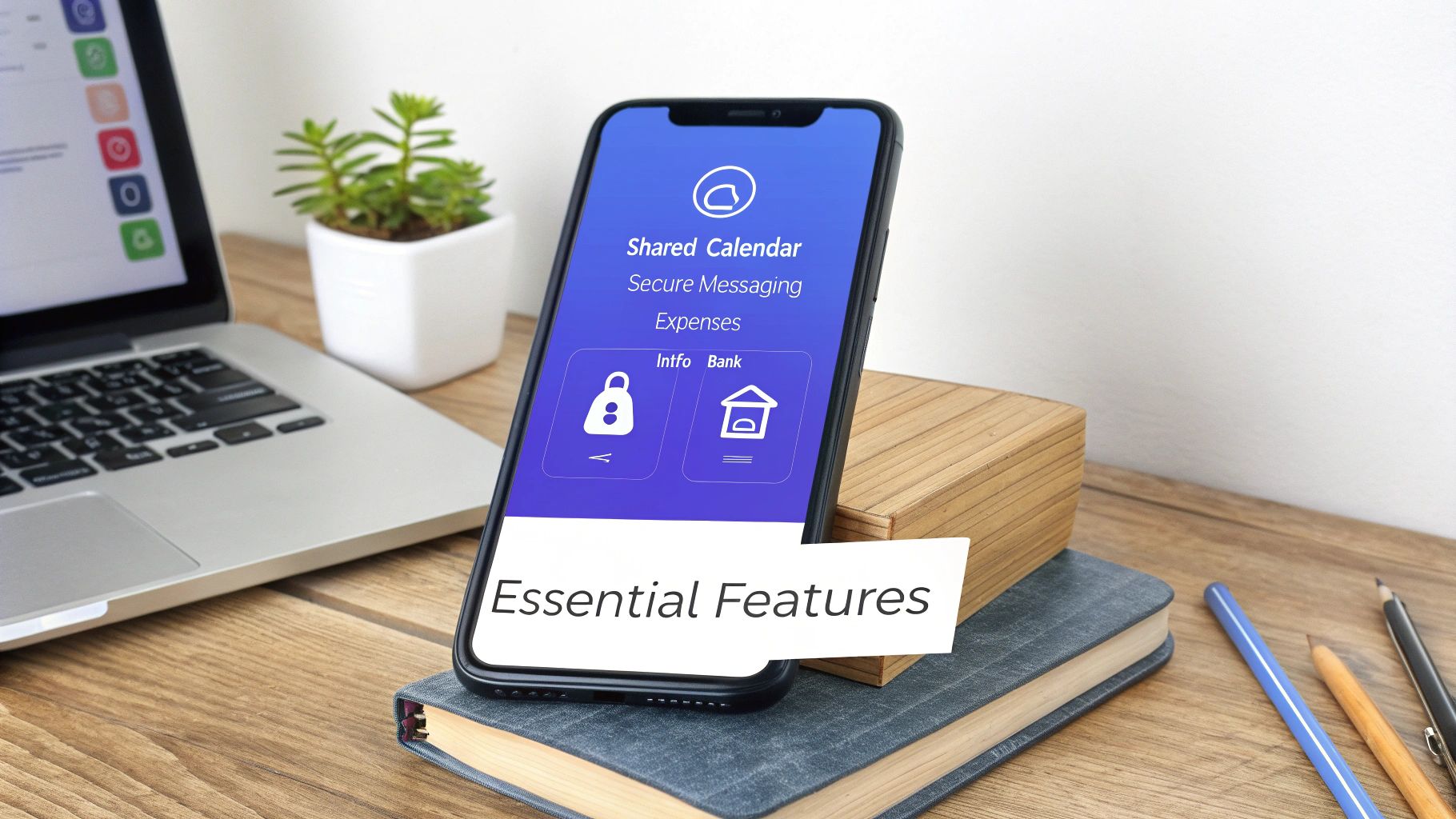
Choosing a co-parenting schedule app can feel overwhelming. A quick search reveals dozens of options, and they all seem to promise the same thing: a simpler, more organized life. But if you dig a little deeper, you'll find that the features that truly make a difference are often buried in marketing jargon.
The best apps I've seen act as a neutral, digital third party. They provide much-needed structure and remove the emotional charge from everyday logistics. It's less about flashy design and more about having rock-solid tools that build accountability and cut down on day-to-day friction.
The Non-Negotiable Shared Calendar
Let's be clear: the shared calendar is the absolute heart of any worthwhile co-parenting app. This needs to be your family's single source of truth for everything from custody handoffs and school events to doctor’s appointments and holidays. A basic digital calendar just won't cut it.
You need a tool built specifically to prevent the common "I thought you said..." arguments before they even start.
Specifically, look for:
- Color-Coding: This seems simple, but it’s a game-changer. Being able to assign a color to each parent and each child makes the schedule instantly readable. One glance and you know exactly who is supposed to be where, and when.
- Request and Approval Workflows: Life happens, and schedules change. The right app won't let these changes happen over a quick, forgettable text message. It should have a formal system where one parent can request a schedule trade or modification, and the other has to officially approve or deny it. This creates a clear, documented paper trail.
Without these two features, you’re basically just using a prettier version of the confusing text threads you’re trying to escape. The whole point is to move away from verbal agreements that are easily misremembered.
Secure and Unalterable Messaging
This is a big one. Unlike texts or emails, which can be deleted, edited, or claimed to be "lost," a top-tier co-parenting app provides a secure messaging platform. Every single conversation is time-stamped, and crucially, it cannot be altered or deleted by either person.
This feature is all about accountability. It ensures that every communication is preserved exactly as it happened. If a disagreement pops up later, you have an accurate, chronological record to fall back on. It immediately shuts down the "he said, she said" dynamic and keeps the conversation focused on facts.
The most effective co-parenting tools are built on the principle of documentation. When both parties know that every message and schedule change is recorded, it naturally encourages more thoughtful and respectful communication.
Tools for Financial Transparency
It's no secret that money is one of the biggest sources of conflict for co-parents. That's why an integrated expense tracker is a non-negotiable feature for me. A good one lets you log shared costs, upload photos of receipts, and send reimbursement requests right inside the app.
This creates a completely transparent ledger for all child-related spending, from soccer cleats and school supplies to co-pays and orthodontist bills. It essentially professionalizes the process of settling up, which helps you avoid those awkward money talks and ensures everyone is reimbursed fairly and on time.
When evaluating apps, it's helpful to separate the absolute must-haves from the nice-to-haves. This table breaks down the features I see as essential versus those that are simply bonuses.
Essential vs. Nice-to-Have App Features
| Feature Category | Must-Have Functionality | Nice-to-Have Perk |
|---|---|---|
| Scheduling | Color-coded shared calendar with request/approval workflow. | Integration with personal calendars (Google, iCal). |
| Communication | Secure, unalterable, and time-stamped messaging. | Tone-check or "emotional spellcheck" feature. |
| Finances | Expense tracker with receipt upload and reimbursement requests. | Exportable financial reports for taxes or legal use. |
| Information | Centralized storage for vital info (contacts, medical records). | A shared photo album or family journal feature. |
| Legal | Ability to grant access to mediators or legal professionals. | GPS check-ins for documenting handoffs (use with caution). |
Focus on getting the "Must-Have" column right first. Those are the features that will solve 80% of your logistical headaches. The perks are great, but they won't make up for a clunky calendar or a messaging system that can be manipulated.
The co-parenting app market, valued at USD 0.44 billion in 2024, is booming for a reason. These tools work. User data consistently shows that core features like synchronized calendars and expense trackers can reduce miscommunication by up to 70%. If you want to learn more, you can discover more insights on the co-parenting app market growth and its key drivers.
Protecting Your Family's Privacy and Legal Rights
When you choose a co-parenting app, you're handing over some of your family's most sensitive information. Think about it: schedules, locations, private messages, and even financial records are all stored in one place. This isn't just about finding a convenient tool; it's a huge decision that directly impacts your family’s privacy and legal footing.
Before you even think about downloading, you need to get serious about how an app handles your data.
Your absolute first line of defense should be end-to-end encryption. This is non-negotiable. It’s the same security technology your bank uses, and it ensures that only you and your co-parent can read what you send. No one in between—not even the app company itself—can access your conversations. If an app doesn’t offer this, walk away.
Verifying Legal Admissibility
Beyond security, you have to consider the legal side, especially if your co-parenting relationship is high-conflict. A simple screenshot of a text message just doesn't hold up in court the way it used to. What you need are records that are verifiable, unchangeable, and certified by a neutral third party—which, in this case, is the app.
This is what makes a digital log legally sound. The platform must be designed to prevent anyone from deleting or editing messages and expense records once they're sent. This creates an unalterable timeline that serves as a reliable, factual record if disagreements ever escalate to the point of needing legal intervention.
A neutral platform can be a powerful tool for accountability. Still, navigating particularly challenging dynamics might require more than just technology. You can find helpful strategies for co-parenting with a narcissist to better protect your family and your legal rights.
Key Questions to Ask Before Subscribing
Don't just take an app's marketing claims at face value. You need to dig deeper and ask the tough questions to truly understand how the platform protects you.
Here’s a quick checklist to run through during your evaluation:
- Can messages or records be edited or deleted? The only acceptable answer is no. The entire point is to have an unchangeable record that keeps everyone accountable.
- How are records exported for legal use? The app should let you generate certified, time-stamped PDF reports. This makes it simple to share a clean, professional record with your lawyer or a mediator.
- What is the app's data privacy policy? You need to know exactly how your information is stored, who can see it, and if it's ever sold to third parties. For more on this, you can review our own policy on how to opt out of data sharing.
- Can you grant access to a third party? The best apps allow you to give view-only access to legal professionals or mediators. This can streamline communication and cut down on back-and-forth during legal proceedings.
Key Takeaway: Think of the best co-parenting app as a digital witness. It should be built to document your interactions with such integrity that its records are trusted by the legal system, giving you a crucial safety net and a clear path forward.
How to Introduce the App to Your Family
Bringing a new system into your co-parenting dynamic can feel tricky. The last thing you want is for it to feel like another source of conflict. Your goal is to introduce the co-parenting schedule app as a tool for clarity and peace, not control.
When you bring it up with your co-parent, frame the conversation around the shared benefits for everyone involved. Focus on making life easier, especially for the kids.
You could try saying something like, "I've been thinking about how to cut down on all the back-and-forth texts about the schedule. I found an app that keeps everything in one place, and I think it could make handoffs way smoother for the kids."
By starting with a shared goal—like less stress and more stability—you immediately find common ground. It's not about winning or losing; it's about working together. The app becomes a neutral third party that just helps you both stay organized.
Creating a United Front
Once your co-parent is on board, the next move is to set it up together. This is a huge step. Don't just configure it all yourself and shoot over an invite. That can feel unilateral. Instead, find a time to sit down and tackle it as a team.
Here’s a simple game plan for that first setup session:
- Start with the basics. Get the core custody schedule entered first. This means your regular weekly handoffs, holidays, and any school breaks already outlined in your parenting plan.
- Add what you already know. Plug in those upcoming school holidays, doctor's appointments, and soccer practices that are already on the calendar.
- Set your communication rules. This is where you agree on how to handle things like schedule change requests. For example, you might decide that all non-emergency requests have to be made through the app with at least 48 hours' notice.
When you bring the kids into the loop, keep it simple and positive. You can frame it as a 'family helper' that makes sure everyone knows what's happening and when. For little ones, try, "This is our family's special calendar so we always know when it's time with Mommy and time with Daddy."
Explaining the App to Your Children
For older kids and teens, you can be a bit more direct. Explain that the app helps you and their other parent communicate better about schedules, which ultimately means less stress and confusion for them.
If you can show them what's in it for them—like making sure they never miss a friend's birthday party or that you both have the right time for their game—they'll be much more likely to get on board.
This process flow gives you a good look at how a co-parenting app can securely manage your family’s private information.
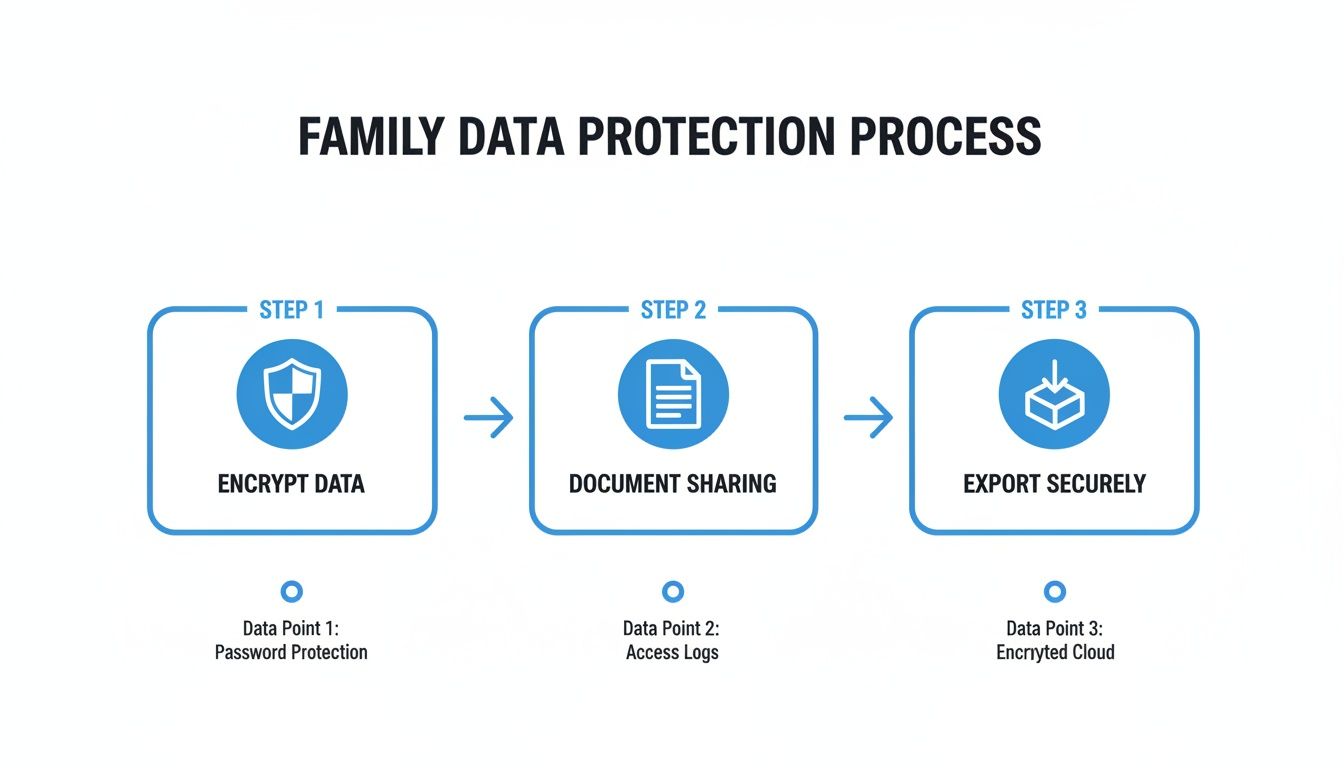
The key takeaway here is that everything is encrypted for privacy, documented so there's a clear record, and can be exported securely if you ever need it for legal reasons.
From here on out, consistency is everything. Use the app for all co-parenting logistics. This builds the habit and solidifies its role as your family's single source of truth.
Bringing Your Co-Parenting Schedule into Your Home

A co-parenting app is fantastic for keeping you and your ex on the same page, but its real magic happens when that schedule becomes a visible, living part of your household. The app gives you a solid plan. The next step? Getting that plan off your phone and into the daily flow of your family's life.
This is the bridge that prevents confusion for everyone—kids, grandparents, even the babysitter. When the schedule is right there for all to see, it lowers anxiety and stops the constant, "Whose house am I going to this weekend?" It just creates a sense of calm, predictable routine.
Syncing Your App with a Central Home Hub
By far, the best way to make your schedule accessible is to connect it to a central family command center. This is where something like a digital calendar for your wall becomes the single source of truth for the entire household, pulling in your co-parenting schedule alongside everything else that makes your family tick.
Imagine one screen in your kitchen showing it all:
- Custody days, pulled directly from your co-parenting app.
- The kids’ soccer practice and piano lessons.
- This week’s meal plan and who’s on chore duty.
Suddenly, you have at-a-glance clarity. A co-parenting app is designed to bring a formal agreement, like a Texas parenting plan template, to life and make sure everyone sticks to it. Syncing that plan to a home hub makes it effortlessly visible.
How to Connect Your Calendar Feed
Most quality co-parenting apps let you export your calendar using a secure web link, often called an iCal feed or URL. Think of this link as a one-way street: it pushes updates from the app to any calendar you connect it to. The process is usually pretty simple and creates a read-only version of your schedule—perfect for a family display.
Pro Tip: Set up the calendar feed on a device that everyone uses. This transforms the abstract schedule on your phone into a tangible, reliable reference point that empowers kids and keeps everyone aligned without constant questions.
This kind of integration is essential for so many families. In the broader parenting app market, shared calendars command 40% of usage—a huge number that shows just how important they are. For the 20 million blended families in the US, maximizing this visibility is a game-changer. A central hub like Everblog complements a co-parenting app by gamifying chores (boosting completion by 40%), syncing grocery lists, and offering voice entry for quick updates. It’s the ideal organized display for a busy home.
Creating a Visual Routine for Your Kids
This isn’t just about logistics; it’s about your children’s emotional well-being. A visual schedule gives them a powerful sense of security and autonomy. They can see what’s coming next—whether it's a sleepover at a friend's house or a weekend with their other parent—which helps them mentally prepare for transitions.
When you make your co-parenting calendar a central piece of your home's organizational system, you transform it from a tool for separated parents into a resource that supports the entire connected family.
Making the App Work for the Long Haul
So, you’ve picked the perfect app, onboarded everyone, and things are running smoothly. Great! But what happens in six months when the novelty wears off and old habits start creeping back in?
Even the best system can start to fray around the edges over time. Maybe your co-parent stops logging expenses or starts sending last-minute schedule changes via text again. It happens. The key is knowing how to get things back on track without starting a fight.
Navigating the Inevitable Roadblocks
When communication starts slipping outside the app, your goal is to gently but firmly redirect everything back to your central hub. Think of it as your official record.
A simple, non-confrontational message usually does the trick. I've found something like this works well: "Hey, could you pop that request into the app? It really helps me keep everything organized in one spot." This frames it as a personal organizational need, not an accusation.
If you find yourselves clashing over the same issues inside the app—like finances or holiday schedules—it's a sign that the app isn't the problem. It’s likely a blind spot in your original parenting plan that needs a bit more clarification.
Your co-parenting app isn't a "set it and forget it" tool. Treat it like a living agreement that needs occasional tune-ups to keep serving your family well for years to come.
Pro-Tips for Long-Term Harmony
To make sure your app stays the single source of truth for your family, you both have to commit to a few ground rules. This isn't about being rigid; it's about protecting the peace and clarity you worked so hard to create.
- Keep It All Business: Agree upfront that all messages sent through the app will stay polite, concise, and focused on the kids' logistics. This stops the platform from turning into another battleground for lingering emotional conflicts.
- Go All In: Make a pact to use the app for 100% of co-parenting matters. Schedules, expenses, doctor's appointments, communication—everything. The second you start making exceptions, the whole system starts to lose its authority.
- Schedule a Quarterly Check-in: Set a reminder to have a quick, 15-minute chat every three months about how the app is working. Are there features you're not using? Are there recurring friction points? This proactive approach nips small problems in the bud before they blow up.
Still Have Questions? We've Got Answers
Even when you find the perfect tool, a few lingering questions are completely normal. Let's tackle some of the most common ones that pop up when co-parents start using a scheduling app.
Are Co-Parenting Apps Actually Usable in Court?
This is a big one. Many of the best apps are built specifically with legal documentation in mind. They create a clean, verifiable record with features like messages that can't be altered or deleted, time-stamped communication, and detailed expense logs.
That said, admissibility isn't universal—it can really depend on your local jurisdiction. The key is to choose an app that actively promotes this feature and, most importantly, have a conversation with your legal counsel about how to properly use and submit those records if the need ever arises.
What if My Co-Parent Won't Get on Board?
This can be a tricky hurdle. Your first move should always be a calm conversation, framing the app as a tool to bring clarity and predictability for the kids. It's not about control; it's about reducing confusion and last-minute chaos.
If that conversation doesn't land, this might be something to bring up in mediation. It’s becoming more common for separation agreements and court orders to actually mandate the use of a specific app to keep communication clear and on the record.
A co-parenting app should be presented as a mutual agreement to lower the temperature. The goal is a stable, drama-free environment where your children can thrive. It's a peace treaty, not a weapon.
Are the Free Apps Good Enough to Bother With?
For very low-conflict situations where you just need a basic shared calendar, a free app can be a decent starting point. Think of it as a test run.
However, you'll quickly find what they're missing. Most free versions lack the heavy-hitting features like certified legal records, secure messaging that prevents "he said, she said" arguments, or granular expense tracking. For most co-parents, investing in a subscription-based app is one of the smartest, most conflict-reducing decisions you can make.
Ready to pull all these moving pieces into one central, easy-to-read hub? See how the Everblog digital wall calendar syncs beautifully with your co-parenting app, giving everyone in the family—kids included—a clear view of the week ahead. Find out how it works and get yours today.


