








Co-parenting communication tools are simply apps and platforms built to help separated or divorced parents keep things organized. They’re designed to manage schedules, track expenses, and handle conversations in a way that’s structured and keeps conflict to a minimum. Think of it as moving all the important kid-related logistics out of messy text threads and into one central, documented hub. Most of them come with key features like shared calendars, secure messaging, and expense trackers that bring much-needed clarity.
Building a Foundation for Peaceful Co-Parenting
Let’s be real for a minute. Successful co-parenting isn't about finding some magical app that solves all your problems. It’s about building a system that actually works for your family. And that system doesn't start with a download—it starts with both of you agreeing to communicate in a new way.
The real goal here is to get out of that reactive, chaotic cycle of texting and move toward a structured, predictable way of sharing information that’s 100% focused on the kids.

This first step is all about creating a strategy that will last, one that cuts down on misunderstandings from the get-go. Laying this groundwork is crucial, and a big part of that is understanding how to improve communication in any shared parenting situation.
Setting Clear Boundaries from the Start
Before you even look at an app, you need to sit down and agree on the rules of engagement. This conversation is probably the most important step you'll take. When you create a framework together, you’re preventing future fights by making sure you're both on the same page about how, when, and where you'll talk about the kids.
Your initial agreement should probably cover these key things:
- Response Times: What’s a reasonable time to expect a reply for non-urgent stuff? Agreeing to something like 24 hours can take away the anxiety of needing to respond instantly.
- Urgency Protocol: Define what an actual emergency is. What warrants a phone call versus what can just be posted on the platform?
- Tone of Voice: This is a big one. Commit to keeping all communication factual and business-like. The point is to exchange information, not to get into an emotional debate.
- Platform Exclusivity: Make a pact that all non-emergency, kid-related logistics will happen only through the tool you choose. No more stray texts or emails.
The best co-parenting systems are built on a foundation of mutual respect and clear boundaries. When you professionalize your communication, you remove the emotional landmines and create a much more stable world for your children.
Why a Neutral Platform Matters
There's a reason dedicated co-parenting apps work better than text or email. They create a neutral, shared space that feels less like a personal inbox and more like a work tool.
That separation is incredibly powerful. It helps you untangle your history as a couple from your ongoing job as co-parents. A neutral platform becomes the single source of truth for everything from the custody schedule to doctor’s appointments.
As you start looking at different options, you'll see how an organized system can dramatically cut down on friction. Our team also put together a guide that explains why co-parenting calendars are so crucial for success, which is a perfect next read as you start planning.
Choosing the Right Communication Tools for Your Family
The number of co-parenting apps out there can make your head spin. But picking the right one is less about the fancy features and more about finding a system that simplifies your life and, most importantly, cuts down on conflict.
Think of it as creating a single source of truth for everything involving the kids.
What works for one family might be total overkill for another. If you and your ex are on great terms, a simple shared calendar might be all you need to coordinate pickups. But for those navigating a high-conflict situation or a particularly complicated custody schedule, a dedicated, feature-heavy platform is non-negotiable. It’s an investment in peace of mind.
Dedicated Co-Parenting Apps vs. General Organizers
Your first big decision is whether to go with a specialized co-parenting app or a general-purpose organizer.
Apps like OurFamilyWizard or TalkingParents are built from the ground up for separated families. They aren’t just schedulers; they’re accountability systems. We're talking about court-admissible messages you can't delete or edit, built-in expense trackers for those "you owe me for soccer cleats" moments, and a secure spot for medical info. They essentially professionalize your co-parenting communication.
On the flip side, tools like Cozi or even a shared Google Calendar can get the job done for amicable co-parents. They're usually free or cheaper and handle basic scheduling perfectly. The catch? They lack the guardrails that prevent miscommunication and disputes in tense relationships.
For a deeper look at just the scheduling side of things, take a look at our guide on finding the perfect co parenting schedule app.
Essential Features in Co-Parenting Communication Tools
When you start comparing options, it's easy to get lost in a sea of features. The table below breaks down the core functions you should look for to solve the most common co-parenting headaches. Focus on what will make the biggest difference for your family.
| Feature Category | What to Look For | Why It's Important |
|---|---|---|
| Messaging | Unalterable, time-stamped messages that can't be deleted. | Creates a permanent, transparent record of communication. This is crucial for accountability and can be used in legal proceedings if necessary. |
| Shared Calendar | Color-coding for each parent, ability to add notes to events, and clear display of custody days. | Becomes the central hub for the kids’ lives, eliminating confusion over who has them when and who is responsible for which appointment. |
| Expense Tracking | Ability to upload receipts, categorize expenses, and request/send reimbursements within the app. | Takes the emotion out of shared finances. It turns arguments over money into simple, documented transactions. |
| Information Bank | A secure, shared space for vital info: allergies, doctor's numbers, school contacts, report cards, etc. | Ensures both parents have instant access to critical information, preventing panicked phone calls and delays in an emergency. |
Ultimately, the goal is to find a platform that feels like a neutral, third-party assistant, keeping the focus on the kids and off of old conflicts.
Must-Have Features to Look For
As you dig in, prioritize the features that directly address your biggest challenges. Not everyone needs everything, but a few core functions provide the most bang for your buck in creating a stable co-parenting setup.
- Secure, Documented Messaging: You absolutely want a platform where messages are locked in—no editing, no deleting. This creates a crystal-clear record of who said what and when. Accountability is everything.
- A Detailed Shared Calendar: This needs to be the heart of your system. It should let both parents easily add, see, and comment on appointments, school holidays, and the custody schedule itself.
- Expense and Reimbursement Tracking: A simple tool for uploading receipts and logging shared costs can single-handedly stop dozens of arguments about money before they even start.
- Centralized Information Bank: Think of this as your shared digital filing cabinet. It’s a secure place to keep emergency contacts, allergy info, medical records, and school report cards so both parents are always in the loop.
The market for these tools is exploding, with a projected growth rate of 14.7% a year through 2033. Why? Because millions of families are tired of the constant bickering. Studies even show these apps can slash parental conflict by up to 30% in high-conflict situations. You can find more data about the co-parenting app market on datainsightsmarket.com.
This growth is great news for you—it means more competition, more innovation, and better tools are hitting the market all the time to help families find a calmer way forward.
Setting Up Your Shared Systems for Success
Okay, so you’ve picked a platform. That’s a great first step, but it’s just that—a first step. The real magic happens when you turn that empty app into a well-oiled machine that actually makes your co-parenting life easier.
Think of this initial setup as your investment in future peace. A bit of organizational work right now will prevent countless arguments and misunderstandings down the road. You're essentially building the operating manual for your co-parenting partnership, creating a single source of truth for every schedule, expense, and important detail.
This flowchart can help you visualize how your current conflict level might steer you toward simpler tools or more structured, high-accountability platforms.
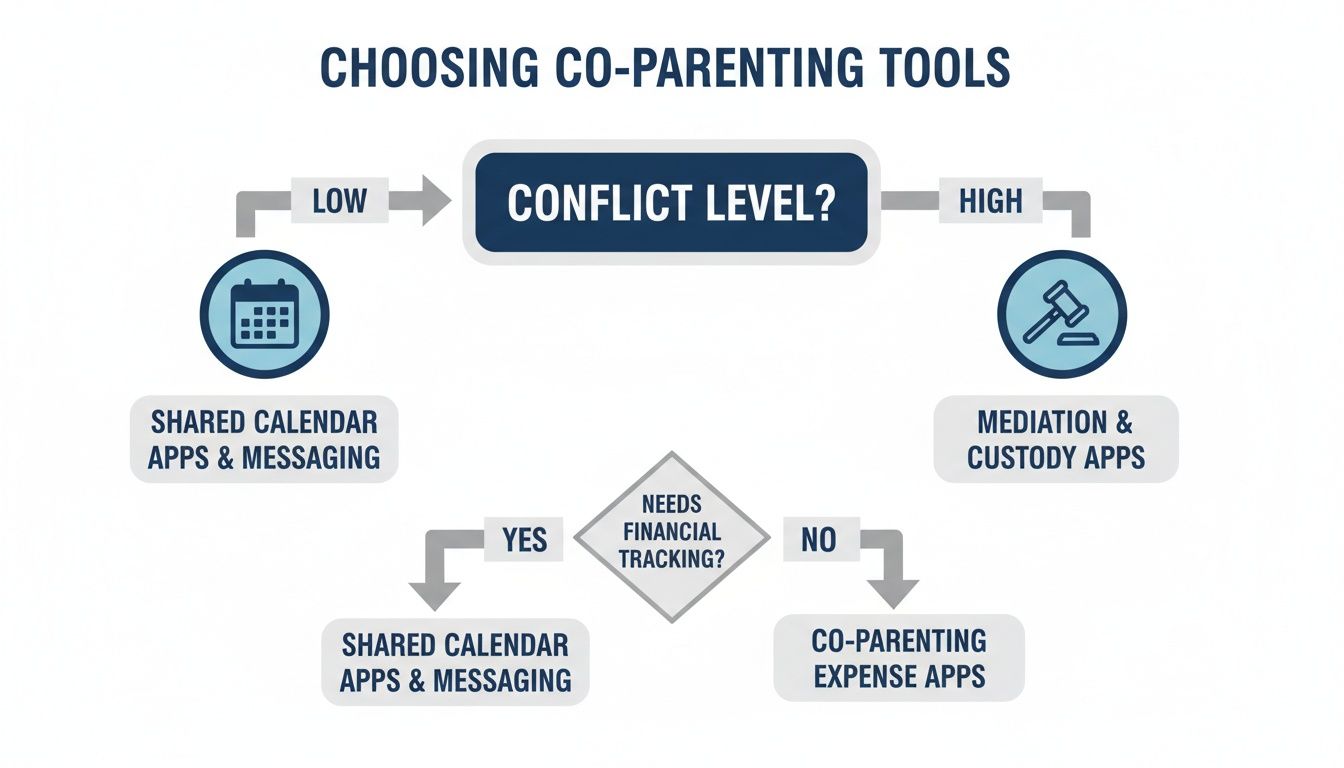
The takeaway here is pretty clear: as conflict goes up, so does the need for tools with built-in guardrails, like court-admissible messaging and airtight expense tracking.
Mastering the Shared Calendar
Your shared calendar is the absolute heart of this new system. If it’s not populated with everything, it's not going to work. A sparse calendar leaves way too much room for assumptions, and we all know where that leads.
Start by layering in all the essential information:
- The Custody Schedule: Get this in first. Input the entire rotation for at least six months out. Use color-coding—one for each parent's time—to make it instantly clear who has the kids when.
- School Events: Drop in the full school calendar. We're talking holidays, parent-teacher conferences, early dismissals, professional development days—all of it.
- Appointments: The minute a doctor, dentist, or therapy appointment is booked, it goes in the calendar. Add the location and a brief note about the reason for the visit.
- Extracurriculars: Every single practice, game, recital, and music lesson needs to be on there. Make sure to note who is responsible for drop-off and pick-up.
Once the calendar becomes the definitive source for your kids' lives, you'll see those endless "Are you getting her from soccer?" texts start to disappear.
Creating Financial Clarity with Expense Tracking
Nothing can derail a co-parenting relationship faster than arguments about money. A structured expense workflow takes the emotion out of it. It transforms potentially heated disputes into simple, documented transactions.
Keep your workflow dead simple:
- Upload Immediately: Made a shared purchase? Snap a photo of the receipt and upload it right away. Don’t let them pile up in your wallet or car.
- Categorize Everything: Use clear categories like "Medical," "School Supplies," or "Extracurricular Fees." This makes tracking and reimbursement a breeze.
- Set a Reimbursement Cadence: Agree to settle up on a regular schedule, like the first of every month. This prevents balances from creeping up and becoming a source of tension.
The goal is to make shared finances as boring and predictable as paying a utility bill. When the process is clear and the documentation is all there, there’s simply less to argue about.
This level of organization elevates your app from a simple tool into a true digital family command center, keeping everyone aligned without the constant back-and-forth.
Building a Central Information Bank
Finally, take advantage of the "info bank" or "digital library" feature in your app. This is where you’ll store all the crucial information you both need to access on the fly, eliminating those frantic "What's the pediatrician's number?!" calls.
Your info bank should become a shared digital brain for your family. Start by creating entries for:
- Emergency Contacts: All family, doctor, school, and caregiver phone numbers.
- Medical Information: A list of allergies, current medications and dosages, insurance details, and vaccination records.
- School Details: Teacher names, school phone numbers, and login info for any parent portals.
- Important Documents: Scanned copies of birth certificates, social security cards, and recent report cards.
Trust me, taking an hour to populate these systems now will save you hundreds of hours in redundant texts and unnecessary stress later on.
Laying Down the Rules of Engagement
The best co-parenting app in the world is useless without some ground rules. Think of this next part as creating your "Communication Charter"—a simple, clear agreement on how you’ll actually talk to each other. This is what turns a messy, emotional process into a predictable, professional partnership that’s 100% focused on your kids.
The goal here is to professionalize your co-parenting relationship. When you treat it like a business partnership, you build trust and stability. That predictability is a huge gift to your children.

Don't worry, this doesn't need to be some stuffy legal document. It's just about outlining the basics of tone, topics, and timing to head off arguments before they even have a chance to start.
Defining Your Communication Ground Rules
The strongest charters are built on just a few key pillars. Sit down and hash these points out together. I promise, the clarity you get now will save you from a mountain of frustration later.
- One Channel to Rule Them All: Agree that all non-emergency communication about the kids will happen exclusively through your chosen app. This stops confusing side-chats via text or email and creates a single, documented source of truth.
- What’s a Real Emergency?: What actually justifies a phone call? Define "urgent" clearly. A medical issue or an accident? Absolutely. A forgotten soccer jersey? That goes in the app.
- Set a Response Clock: One of the biggest anxiety-drivers is waiting for a reply. Agree on a reasonable window for non-urgent messages, like 24 hours. This simple rule removes the pressure for an instant answer and gives everyone breathing room.
Setting these boundaries creates a system that respects both your time and your emotional bandwidth.
Keeping the Tone Factual and Productive
Tone is a minefield in digital messages. One person’s quick, efficient note can easily feel like another’s cold, hostile jab. This is where setting intentional guidelines is a game-changer.
The goal of every message should be to exchange information, not emotion. Before you hit send, ask yourself: "Is this message factual and focused on a solution for our child?" If the answer is no, it's time for a rewrite.
A simple but powerful habit is to re-read every message before sending, specifically to hunt down and remove emotional language. Some of the more advanced co-parenting apps even have built-in "tone meters" that flag potentially inflammatory words, which can be a lifesaver. You can also get better at framing conversations constructively through the use of 'I Feel' statements, which help keep dialogue respectful and clear.
A Sample Communication Charter Template
Your charter can be as simple as a bulleted list you both sign off on. It just needs to be a constant reminder of your shared commitment to keeping the peace.
Here’s a basic template to get you started:
- Primary Channel: All talk about schedules, expenses, and kid updates happens in our co-parenting app. No exceptions.
- Emergency Protocol: Phone calls are only for true emergencies (e.g., medical issues, accidents).
- Response Window: We’ll respond to all non-urgent messages within 24 hours.
- Tone Agreement: We keep all messages factual, business-like, and focused on what’s best for the kids.
- Review Before Sending: We both agree to take a breath and review messages for emotional digs before hitting send.
This simple agreement provides the structure you need to make your tools work, creating a low-conflict environment where your family can thrive.
Troubleshooting Common Communication Hurdles
Even with the best game plan, friction is going to happen. Life gets messy, old habits are hard to break, and even the most well-intentioned communication can go off the rails. This is the moment your chosen co-parenting communication tools shift from being simple organizers to becoming essential tools for conflict resolution.
It helps to think of these challenges not as failures, but as chances to double down on your new communication agreement. Instead of getting sucked into a frustrating back-and-forth, you can pull out a calm, almost business-like strategy. The real key is having a playbook ready for these common hurdles so you're not caught flat-footed when they pop up.
When One Parent Refuses to Use the App
This is easily one of the most common and maddening problems. You've set up this great system, only to have your co-parent keep sending important updates through random texts or, worse, not at all. The instinct is to get angry, but let's be honest, that rarely fixes anything.
What works is a consistent, gentle redirect. Every single time a non-emergency message comes through the wrong channel, you send back a polite but firm reply.
Example Script: "Thanks for letting me know. Can you please pop this into the shared app so we both have the official record? It really helps me keep everything straight on my end."
This simple tactic does two crucial things: it sidesteps a direct fight while continuously reinforcing the process you both agreed on. After you do it a few times, you're no longer just asking—you're actively training them on the new protocol. If the refusal continues, documenting your attempts inside the app gives you a clear, time-stamped record of your efforts to keep communication organized and transparent.
Handling Last-Minute Schedule Changes
A sudden request to swap a weekend or change a pickup time can throw your whole week into chaos. The secret here is to separate the request itself from any emotional baggage that might be attached to it. Your communication protocol is your best defense.
- Acknowledge the Request: First, just confirm you saw the message. A simple, "Got it, let me check the calendar and get back to you" is perfect. It buys you time and lowers the tension.
- Consult the System: Always, always go back to your shared calendar and the parenting plan. This immediately makes the decision about logistics and facts, not about power plays or who's "winning."
- Provide a Clear Answer: Whether it's a "yes" or a "no," be direct. Base your reasoning on the established schedule. If you have to say no, explain the logistical conflict without apology. For example: "Sorry, I can't make that work. We already have a family commitment scheduled that day."
This method effectively removes personal feelings from the negotiation. It's not you saying "no"; it's the schedule you both agreed to that doesn't allow for the change.
Navigating Passive-Aggressive Messages
Nothing can reignite an old conflict faster than a sarcastic comment or a passive-aggressive jab buried in a seemingly innocent message. The single most effective strategy is to completely ignore the emotional subtext and respond only to the factual part of the message.
Let's say you get a message like: "I guess I'll be the one to buy his winter coat again since it's getting cold."
Do not take the bait. Instead of getting defensive, just respond with a simple, business-like question that focuses entirely on the child's needs.
Actionable Response: "Good point about the weather. Let's add 'winter coat' to this month's shared expense list. What size does he need now?"
This move de-escalates the situation instantly. You’re addressing the practical need—the coat—while completely sidestepping the passive-aggressive tone. When you do this repeatedly, you're teaching your co-parent that emotional manipulation won't get the reaction they're looking for, making it a far less effective tactic over time. Your co-parenting app becomes a platform for solutions, not arguments.
Getting Ahead of Common Co-Parenting Tool Questions
Even with the best intentions, rolling out a new communication system can hit a few snags. It’s one thing to agree on a plan; it’s another to put it into practice when old habits die hard.
Let’s walk through some of the most common "what if" scenarios. Thinking about these ahead of time means you’ll have a clear, calm answer ready instead of getting pulled back into old, frustrating communication patterns.
"What if My Co-Parent Just... Won't Use It?"
This is probably the most common roadblock, and it's incredibly frustrating. You’ve done the work, set up the system, and they just... text you anyway. The knee-jerk reaction is to get angry, but that rarely helps.
First, try to have a calm conversation revisiting why you both agreed to this in the first place. Frame it around the benefits for the kids—less confusion, more organization, lower conflict. It’s not about winning; it’s about making life smoother for everyone.
If they still resist, your best move is quiet consistency. Don't ditch the app. For every text or off-platform email you get about logistics, gently guide them back. A simple, "Thanks, can you pop this into the app so it's all in one place?" is non-confrontational and reinforces the boundary. You continue using the platform for everything. This isn't just about being stubborn; it creates a clear, documented history of your efforts to stick to the plan.
The Bottom Line: Don't abandon the system just because your co-parent does. By consistently using the agreed-upon tool, you build a reliable record of your communication. This can be crucial in high-conflict dynamics or if your communication plan is part of a court order.
"Can We Actually Use These Messages in Court?"
A huge question, especially for anyone navigating a high-conflict separation. The good news is that many dedicated co-parenting communication tools like OurFamilyWizard or TalkingParents were built specifically for this. Their whole selling point is creating unalterable, time-stamped records. You can't edit or delete messages, which provides a transparent log of who said what, and when.
However—and this is a big "however"—rules of evidence vary wildly from one jurisdiction to another. While these apps are widely recognized and accepted in family courts, it's not a 100% guarantee. You should always consult with your family law attorney to understand the specific requirements for submitting digital evidence in your case. Think of the app as a powerful tool for documentation, not a substitute for professional legal advice.
"How Do We Handle Actual Emergencies?"
This is a valid fear. No one wants to be stuck waiting for an app notification when a child is hurt or truly needs help. This is exactly why your communication charter needs to be crystal clear about what is—and isn't—an emergency.
You and your co-parent need to agree on a tiered system.
- Emergencies: These are for immediate threats to health and safety—a medical issue, an accident, or a child in danger. These situations always warrant a direct phone call or text. No questions asked.
- "Urgent" (but not an emergency): A forgotten textbook, a last-minute request to swap a weekend, or a question about a playdate feels urgent to the person asking, but it doesn’t require bypassing the system. These belong in the app.
- Response Times: For everything inside the app, agree on a reasonable response window, like 24 hours. This simple rule deflates so much anxiety. It removes the expectation of an instant reply and stops every minor logistical hiccup from turning into a perceived crisis.
Having these definitions sorted out means you can connect instantly when it really, truly matters, while keeping all the day-to-day noise organized and documented where it belongs.
At Everblog, we believe that a central, visual hub is key to a calm and organized home. Our digital family wall calendar simplifies scheduling, chores, and meals, creating a single source of truth for everyone. Learn more about how Everblog can bring clarity to your family's routine.


