
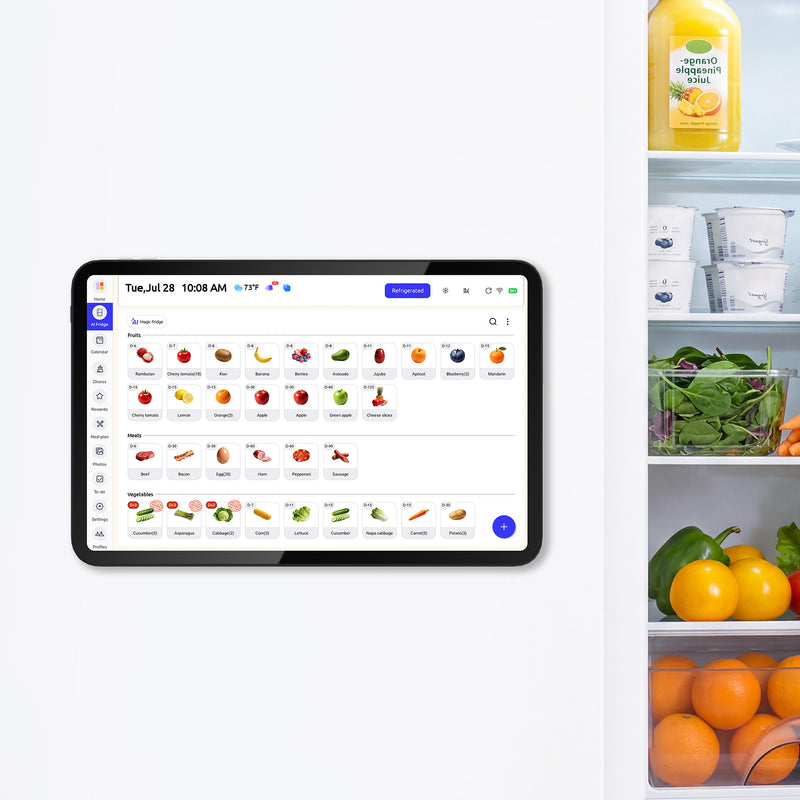


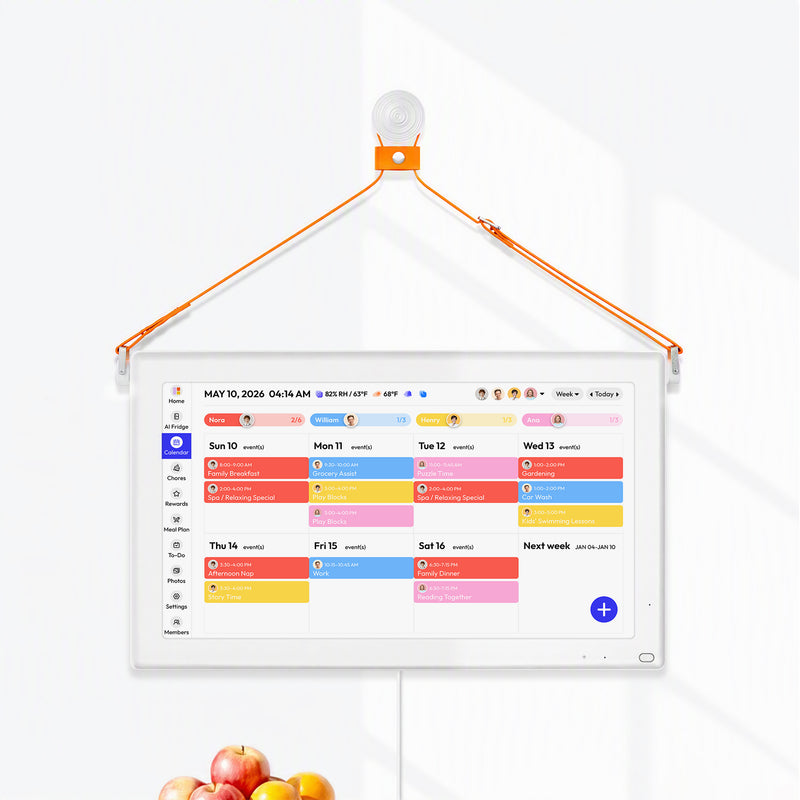


A smart fridge calendar with grocery list tools can connect what is at home, what the family plans to eat, and what shoppers need to buy. The dependable method is not “inventory automatically becomes a perfect list.” It is a short human-reviewed workflow: check food on hand, classify it, calculate meal gaps, publish one shared list, and correct the inventory after shopping.
This guide runs that workflow with ten ordinary items and two shoppers. It shows where a shared kitchen display can reduce guesswork and where someone still has to count, judge usability, enter a quantity, or confirm a substitution.
Before You Shop Check What You Already Have
Four states make food inventory easier to maintain than exact counts for every item. Use precise quantities only when a recipe or recurring purchase actually depends on them.
|
State |
Meaning |
Example |
Shopping action |
|
Enough |
Usable quantity covers the plan |
Eight eggs for a six-egg breakfast |
Do not add |
|
Low |
Some remains, but not enough for planned use |
One cup of milk; three cups needed |
Add the gap |
|
Missing |
None is available or usable |
No tortillas |
Add required quantity |
|
Use First |
Food is available but should shape the plan soon |
Open spinach nearing its quality limit |
Plan it before buying more |
The “Use First” state is especially important. It prevents a usable ingredient from being treated as invisible simply because it is not part of tonight's original idea. For date labels, storage, and sensory checks, review a fuller guide to understanding food expiration dates. A calendar reminder does not determine whether food is safe.
What Do “Enough,” “Low,” “Missing,” and “Use First” Mean?
Someone must still look at the food. “Enough” means enough usable product for the meals currently planned. It does not mean the package once held enough. A damaged seal, questionable storage, or an ingredient already reserved for another meal can change the state.
When Do You Need an Exact Quantity?
“Low” is useful during a quick scan, but the shopping list needs a buy amount. Convert the state into a quantity only after the family knows what the ingredient is for. That keeps inventory upkeep light while making the list specific.
A Weekly Food Check With Ten Everyday Items
The proposed test uses ten foods commonly spread across the refrigerator, freezer, and pantry. It is an editorial walkthrough, not a measured household trial.
|
Item |
Observed amount |
State |
Planned use or note |
|
Milk |
About 1 cup |
Low |
Oatmeal, cereal, and one sauce need 5 cups |
|
Yogurt |
4 cups |
Enough |
Four lunches |
|
Eggs |
8 |
Enough |
Six needed for Saturday breakfast |
|
Spinach |
Half an open bag |
Use First |
Add to Tuesday pasta |
|
Cilantro |
None |
Missing |
Taco topping |
|
Chicken |
1 pound frozen |
Enough |
Wednesday sheet-pan dinner |
|
Rice |
About 1 cup dry |
Low |
Two dinners need 3 cups dry |
|
Tortillas |
None |
Missing |
Eight needed for Thursday tacos |
|
Cereal |
One nearly full box |
Enough |
No purchase needed |
|
Leftovers |
Two servings |
Use First |
Monday dinner for two adults |
The scan begins with the refrigerator, continues to the freezer, and ends in the pantry. That sequence matches the practical advice from the U.S. Environmental Protection Agency, which recommends checking all three storage areas before shopping, planning meals for the week, and noting quantities on the list.
Start With the Foods Your Family Often Buys Twice
Do not begin by cataloging every condiment, spice, and freezer bag. Track the categories that repeatedly create duplicates, emergency trips, or forgotten food. A useful starter inventory often includes fresh produce, dairy, proteins, leftovers, and a handful of fast-moving staples.
“Use First” should influence meals before purchases
The spinach and leftovers are not shopping needs. They are planning inputs. Monday can use the leftovers, and Tuesday's pasta can absorb the spinach. Only after those decisions should the family calculate missing food.
Planning Dinner: Calculate What You Need to Buy
The grocery calculation is simple: required quantity minus usable quantity equals the amount to buy. The hard part is making the units and assumptions clear.
|
Ingredient |
Required for plan |
Usable at home |
Buy amount |
Reason |
|
Milk |
5 cups |
1 cup |
4 cups, rounded to suitable package |
Breakfasts and sauce |
|
Yogurt |
4 cups |
4 cups |
0 |
Existing quantity covers lunches |
|
Eggs |
6 |
8 |
0 |
Two remain after breakfast |
|
Spinach |
Half bag |
Half bag |
0 |
Existing bag goes into pasta |
|
Cilantro |
1 bunch |
0 |
1 bunch |
Taco topping |
|
Chicken |
1 pound |
1 pound |
0 |
Frozen package reserved for Wednesday |
|
Rice |
3 cups dry |
1 cup dry |
2 cups dry |
Wednesday bowls and Friday stir-fry |
|
Tortillas |
8 |
0 |
1 pack of at least 8 |
Thursday tacos |
|
Cereal |
1 box |
Nearly full box |
0 |
Enough for planned breakfasts |
|
Leftovers |
2 servings |
2 servings |
0 |
Monday meal for adults |
Package sizes will not always match the arithmetic. The shopper may need to choose a half gallon of milk rather than exactly four cups, or a tortilla pack larger than eight. The shared list should show both the requirement and any acceptable package range when overbuying matters.
Reserve ingredients before treating them as available
The chicken counts as usable only because it is assigned to Wednesday. If one family member uses it for lunch, the shared inventory must change or the dinner plan must. A note such as “reserved for Wed” prevents the same ingredient from supporting two imaginary meals.
Match units before subtracting
Do not subtract “one carton” from “five cups” unless the carton size is known. Use household-friendly units and include a store unit when helpful: “milk, need at least 4 cups, buy 1 half gallon.” This small detail reduces substitutions that technically check off the item but do not cover the plan.

Two People Shopping Keep One Shared Grocery List
The shared grocery list becomes authoritative only when both shoppers agree to use it. One person adding items in a notes app while another shops from a paper list recreates the original problem.
Give every item a status and optional owner
Use a compact status set: Needed, Claimed, Purchased, or Not Found. If Alex is already near the grocery store, Alex can claim milk and tortillas. Jordan can see those items are being handled without deleting them before the purchase occurs.
An item should move to Purchased only when it is actually in the cart or home, depending on the family's rule. Choose one definition and keep it consistent. “Claimed” is not the same as bought.
Add substitution boundaries before shopping
Some items need no discussion. Others do. “Cilantro, one bunch, skip if wilted” is clearer than “herbs.” “Tortillas, flour or corn, at least eight” leaves room for a useful substitution. Allergy-sensitive or brand-specific items should state the exact constraint rather than rely on memory.
A shared family grocery-list workflow can help households decide how to divide stores, owners, and updates. The process matters more than whether the list lives on a display, phone, or paper.
After Shopping Update What Actually Came Home
Inventory accuracy improves when the family records exceptions, not when everyone pretends the first plan was correct. A two-minute correction step catches substitutions, unavailable items, and mistaken counts.
|
Correction event |
What changed |
Inventory update |
List or meal response |
|
Milk package larger than required |
Half gallon purchased |
Set amount to package received |
No action; plan extra use if needed |
|
Cilantro unavailable |
Nothing purchased |
Keep Missing |
Use another topping or revise tacos |
|
Rice count was wrong |
Pantry had 2 cups, not 1 |
Change usable amount |
Buy only 1 additional cup equivalent |
|
Spinach quality failed check |
Existing bag not used |
Remove from usable inventory |
Add replacement or change pasta |
|
Tortillas substituted |
Ten corn tortillas purchased |
Add quantity and type |
Confirm household accepts substitution |
|
Chicken used early |
Reserved package gone |
Set Missing |
Buy chicken or move backup meal |
Use the correction log during the first two or three cycles to expose where the system fails. Then keep only the fields the family needs.
Restocking closes the loop
Purchased items must return to inventory if the household expects the next list to use inventory data. That update can be a count, a state, or a simple “present” marker. The right level of detail is the level the household will maintain.
Exceptions are more useful than blame
If two cartons of milk were purchased, identify the workflow gap: Was “Claimed” missing? Did one shopper use an old screenshot? Was update access unavailable in the store? Fix the handoff instead of adding more alerts.
Where a Fridge-Side System Can Support the Workflow
A fridge-side system can keep inventory, meals, and the shopping list visible where food decisions occur. It is most helpful when the household wants a common kitchen view plus phone access while shopping.
A shared grocery and inventory display for the refrigerator currently describes meal planning, shopping lists, food inventory, expiration information, recipe suggestions, and companion mobile access. Those features place related information together, but the public page does not establish that every inventory change automatically creates the correct shopping-list quantity. Treat suggestions as a starting point and review the final list.
The format adds responsibilities. Someone must enter or correct food, charge the display, manage account access, and check connectivity. Test update timing, offline behavior, permissions, and substitutions with the household's phones and accounts. The product also cannot inspect questionable food or determine that it is safe.
For some homes, a magnetic paper list on the refrigerator is enough. A list app may suit a household that shops together and already checks phones reliably. A dedicated inventory app can provide more detailed tracking for people willing to maintain it. The best system is the simplest one that completes the loop.

Run the Ten-Item Test Before Expanding
Test the workflow with ten frequently used foods for one week. Do not upload the entire kitchen on day one.
- Select ten foods that are often duplicated, forgotten, or needed for planned meals.
- Mark each as Enough, Low, Missing, or Use First.
- Plan three to five meals using available food first.
- Calculate exact gaps and publish one shared list.
- Have two people claim or buy items, then correct the inventory.
Track duplicate purchases, missing ingredients, and required corrections. This is a proposed test, not a promise that a tool will eliminate them. Expand gradually only if the list stays accurate with little effort.
Common Failure Modes and Fixes
A shared list fails when its rules are ambiguous. The quickest fixes address behavior rather than adding more software.
The inventory is detailed but stale
Reduce the number of tracked foods and use broad states. A short current list beats a complete list from last month. For physical visibility, reorganize shelves so food is easier to scan using practical fridge organization principles.
Both shoppers buy the same item
Add a Claimed state and keep claimed items visible until purchased. Avoid sending screenshots, because they stop reflecting later updates.
Meals change after the list is built
Recheck the list after a major schedule or meal change. Remove ingredients that no longer have a planned use and add only the gaps created by the replacement meal.
The system treats dates as safety verdicts
Expiration information can prompt review, but storage history, package condition, official guidance, and sensory warning signs still matter. When in doubt, follow authoritative food-safety advice rather than an app suggestion.
Frequently Asked Questions
Can a smart fridge calendar create a grocery list automatically?
Capabilities vary. Some systems place inventory, meals, and lists together or offer suggestions, but families should verify whether quantities transfer automatically and review every proposed item before shopping.
How much of the kitchen should I track?
Start with ten to twenty high-friction foods: fresh items, leftovers, proteins, dairy, and frequently duplicated staples. Expand only if the data stays current.
What is the difference between Low and Use First?
Low means the quantity may not cover the current plan. Use First means existing food should influence the plan soon. An item can be both, but choose the action that matters most.
How do two shoppers avoid duplicate purchases?
Use one authoritative list, add a Claimed status, define when an item becomes Purchased, and avoid static screenshots. Each shopper should refresh or reopen the live list before checkout.
Is an inventory reminder enough to judge food safety?
No. A reminder can tell someone to inspect food, but it cannot replace storage guidance, package checks, temperature history, or professional advice.


