


You can keep loved ones present in daily life without saving every file by using a simple archive system, a shared family calendar, and a weekly meal-planning rhythm. The goal is easy recall, not endless storage.
Have you ever searched for one meaningful photo before a family dinner and lost 20 minutes in a scroll of near-duplicates? Families that switch to one shared calendar and a lightweight organization system often reduce missed events, wasted groceries, and last-minute stress within weeks. You’ll get a practical way to preserve memories so they feel close, not buried.
Decide What Deserves Space in Your Digital Home
Spot the real cost of “keep everything”
A family digital clutter pattern starts when photos, videos, voice notes, and documents live across phones, laptops, cloud drives, and old cards, making retrieval slower and loss more likely. In family operations, that clutter shows up as missed anniversaries, duplicate shopping, and repeated “Where is that file?” moments.

The digital hoarding literature describes the same emotional friction many families feel: distress when deleting and functional overload from too many files. Use a keep/delete rule you can apply in under 10 seconds per item: emotional value, visual clarity, and uniqueness. If an item fails two of three, archive or delete it.
Applicability and Quick Validation
The 10-second keep/delete screen is a household heuristic for triage, not a universal rule for every family or context. Evidence on digital photo hoarding behavior among university students shows emotional attachment can shape keep/delete decisions, so one-size thresholds should be calibrated before full rollout.
Pilot the rule on 20 mixed files, log decision time per item, record keep rate, and review regret or retrieval misses after 7 days; then adjust thresholds or add an “archive for later” state. Keep your preservation controls unchanged during this test, including routine integrity checks in line with fixity guidance.
A company also notes that disorganization can increase avoidable costs through missed lessons, no-show fees, and grocery waste. Treat decluttering as household infrastructure, not just “photo cleanup.”
Build a Searchable Archive in One Afternoon
Use publisher-style structure, then keep it light
A publisher-style archive system is practical at home: run a 1–3 hour audit, sample 100 assets, log file types and duplicates, and set core facets (Date, People, Event, Place, Media Type, Editorial Tag, Rights, Preservation). Keep controlled vocabulary strict, like always using Birthday rather than variants.

A master folder and filename convention keeps memories searchable over years: YYYY-MM-DD_event_place_person_v###.ext. Keep one working library, one cloud copy, and one offline external copy, then verify monthly or quarterly and freeze a read-only annual archive. This cadence aligns with NDSA fixity guidance for routine integrity checking. The NDSA Levels v2.1 frame storage redundancy and integrity monitoring as separate controls, which maps here to one working copy plus cloud and offline copies. Using a checksum manifest for periodic verification and the annual read-only archive is a household implementation of fixity checking to detect unintended change over time.
Turn Calendars Into Memory Triggers, Not Stress Triggers
Keep categories few and reminders predictable
A a company works best when you limit categories to 5–7 and use stable reminder defaults: 8:00 PM the night before for all-day events, 15 minutes before timed events, and 7:00 AM day-of for weekly recurring items. Add remembrance dates, recipe anniversaries, and “story nights” as recurring events so memory-keeping becomes automatic.
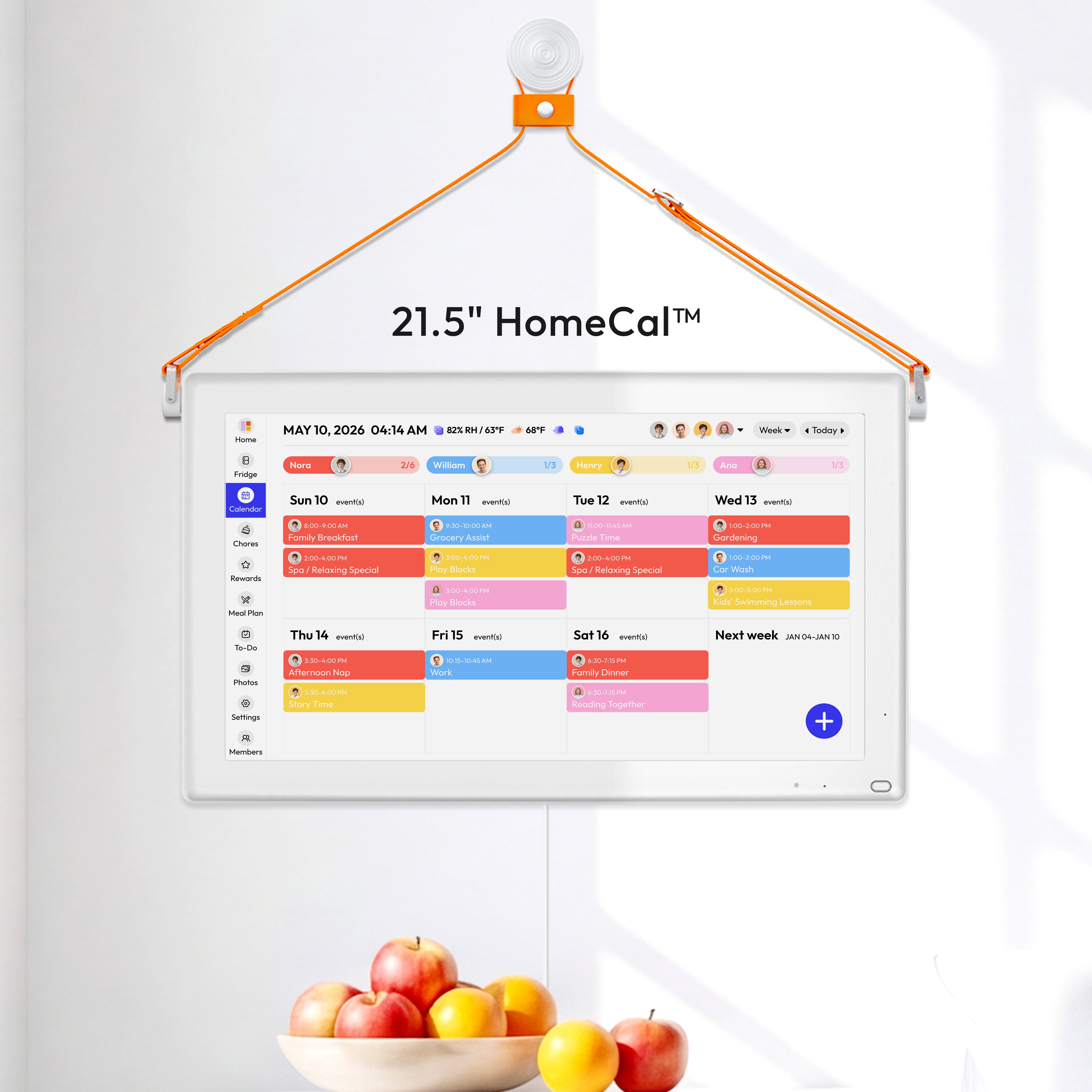
A shared color-coded calendar helps distribute mental load: everyone sees one family view, members can filter by person, and reminders can run by push or email. Cozi supports up to 12 family members and read-only sync with Google, Outlook, and Apple calendars, which keeps one source of truth without forcing everyone onto one ecosystem.

An AI-assisted shared calendar app can reduce manual entry by extracting events from forwarded school/activity emails and issuing daily digests. Low-budget alternative: stay on free Google or Apple Calendar and add a weekly 15-minute manual review every Sunday at 5:00 PM.
Use Meal Planning to Keep Family Stories in Motion
Make remembrance part of dinner, not extra work
A weekly family meal plan replaces nightly micro-decisions with one planning session, and the evidence cited there links consistent planning with better diet quality and variety. Use a 5+2 format: plan 5 dinners, keep 2 flexible nights, and rotate chooser nights from a 20–30 meal list that includes legacy dishes tied to loved ones.

A shared organizer with list tools can store recipe photos, convert note snapshots to lists, and attach links so memory dishes are easy to repeat. Low-skill alternative: keep one laminated “family classics” sheet on the fridge and update it monthly with a dry-erase marker.
Safety & Boundaries
Protect privacy, and know when to pause
A rights-first archive policy should default to private sharing (FamilyOnly), preserve originals and source metadata, and require explicit permission before sharing outside the family. For minors, avoid public albums and remove school/location details from captions, consistent with COPPA protections for children under 13.
A digital hoarding risk profile includes stress and impaired daily functioning, so this approach is not for every moment or every person.
Use this Pause & Safety Rules template each session:
- Work in 30–60 minute blocks, then take a 10-minute break.
- Use a buddy or rotation rule: one person edits, one person observes, then switch.
- Set stop triggers before starting: panic surge, escalating family conflict, or inability to calm after a break.
- Fill local contacts before each session: trusted person _____; licensed mental health professional _____; local crisis resource or emergency number _____.
- Escalation path: pause immediately -> contact a trusted person -> contact a licensed mental health professional -> contact local crisis support or emergency services if there is immediate risk.
Pause and consult a professional if any of these apply:
- You feel panic, guilt, or conflict that escalates during deletion sessions.
- Grief is acute (for example, within recent bereavement) and organization work worsens sleep, appetite, or mood.
- Family members dispute ownership, access, or inheritance of digital assets.
- You need legal clarity on estate access; consult an estate attorney.
- You notice compulsive saving/deleting patterns; consult a licensed mental health professional.
This guide is educational and not legal, medical, or mental-health advice. If distress, conflict, or inheritance questions are significant, pause deletion work and seek individualized support through a primary care referral, a licensed therapist directory, or a state/local bar association lawyer-referral service. During high-risk disputes, halt permanent deletions and preserve a full dated snapshot for professional review.
Practical Next Steps
Start small and finish one complete loop this week. A complete loop means one audit, one naming rule, one shared calendar ritual, and one meal-memory ritual.
- Run a 90-minute memory audit this weekend; cost: 20 if you need one external drive label kit; effort: low to moderate. Low-budget/low-skill alternative: audit only the last 6 months of phone photos.
- Apply one filename pattern and 8 core tags to the top 200 files; cost: $0; effort: moderate. Low-budget/low-skill alternative: tag only Date, People, and Event.
- Configure one shared family calendar with 5–7 categories and 3 default reminders; cost: $0 to $49.99/year depending on app choice; effort: low. Low-budget/low-skill alternative: one shared Google Calendar plus a weekly agenda email.
- Schedule a 30-minute Sunday meal plan with one remembrance dish every two weeks; cost: neutral to grocery budget; effort: low. Low-budget/low-skill alternative: rotate 10 repeat meals and add one “memory meal” card to your shopping list.
Monthly/Quarterly Verification Checklist (copy/paste):
- Backup completeness: target ___% of selected folders present in working, cloud, and offline copies; record result ___%.
- Random restore test: restore 1 file/month (or 3 files/quarter) from backup; mark Pass/Fail.
- Duplicate-rate check: sample 100 assets (or every 10th file until 100), record near-duplicate rate ___%, and compare to your threshold ___%.
- Fixity check: generate and compare checksums for sampled files; record Match/Mismatch and any repair action.
- Audit log update: date, who checked, what failed, what was fixed, next review date (Yes/No complete).
- Access and metadata control: confirm access logs are enabled for shared locations and original metadata is preserved; record exceptions and follow-up (Yes/No).
- Annual snapshot and dispute hold: create or verify a signed, read-only annual snapshot with checksum manifest; if ownership or inheritance is disputed, halt deletions and preserve a full snapshot before changes (Complete/Not needed).
A 1–3 hour audit can follow this timeline: 20 minutes inventory, 30 minutes sampling and duplicate review, 30 minutes restore/fixity checks, 10 minutes log and actions; extend each block for larger libraries using fixity and checksums practices.
Before you commit, use this decision checklist:
- I can find one memory item in under 60 seconds.
- Our family uses one shared calendar as the primary source of truth.
- We have a 3-copy backup routine with monthly or quarterly checks.
- Meal planning includes at least one recurring family tradition.
- Privacy defaults are set to family-only unless explicitly changed.
References
- Organize your family archive like a publisher
- How to organize family schedule digitally
- Cozi messages and reminders
- From digital clutter to family treasure
- Sense: Shared Family Calendar
- Family meal plan
- Digital hoarding study (IJERPH, 2025)
- NDSA Levels of Digital Preservation (v2.1)
- Checking Your Digital Content (NDSA)
- PREMIS preservation metadata standard
- FTC COPPA final rule updates (2025)
- FTC COPPA policy statement (2026)
Further Reading by Need:
- Preservation standards: Library of Congress Recommended Formats Statement 2024-2025
- Privacy/sharing policy starters: Keeping Personal Digital Photographs
- Digital estate law overview prep: What People Are Asking About Personal Digital Archiving


