





Late in the year, school events, work deadlines, travel, meals, chores, and holiday plans all compete for the same hours. The best tech gifts for a busy family support a routine the household already has. They work for more than one person, fit the family's phones and services, and remain useful after the wrapping paper is gone.
Holiday spending is substantial, but that doesn't make a pricey gadget a good fit. The National Retail Federation's 2026 holiday forecast projected November and December retail sales of $1.013 trillion, up 4.2% from 2025. Consumer Technology Association holiday research reported in 2025 that 88% of U.S. holiday shoppers planned to buy technology products.
This guide treats a useful gift for a family as a household decision, not a specification contest. Compare shared value, setup, subscriptions, compatibility, privacy, maintenance, and total cost before choosing.
How We Chose Tech Gifts That Families Will Actually Use
These seven categories were selected through a practical editorial screen. This is a category guide, not a claim that every product has been hands-on tested.
Shared Value Comes Before Novelty
A family gift should serve several people or support a shared routine. A new phone may be an excellent personal gift, but it doesn't meet that standard. A calendar everyone can see, a vacuum that maintains common floors, or a photo frame relatives can update has a clearer household role.
Ask who will use the gift on an ordinary Tuesday in February. If the answer is only the person who opens the box, shop for that individual instead of calling it a family gift.
Setup and Maintenance Count as Part of the Gift
Account creation, installation, charging, cleaning, replacement parts, software updates, and troubleshooting are part of ownership. Identify who will manage them. A gift becomes weaker when it quietly transfers a new project to a parent who already handles the household's technology.
The giver can pay for accessories or offer setup help, but the recipient should approve placement and enter private credentials.
Compatibility, Subscriptions, and Privacy Can Change the Real Cost
Check operating systems, calendars, smart-home platforms, Wi-Fi bands, account sharing, child profiles, and recurring fees. Then review what data the device collects. Voice recordings, camera feeds, location, floor maps, children's profiles, and calendar details carry different privacy concerns.
The purchase price is only the first line. Add subscriptions, content, filters, bags, brushes, storage, mounting hardware, and replacement accessories before comparing value.
The Gift Should Fit an Existing Family Habit
Match technology to behavior that already exists: checking the kitchen schedule, sweeping crumbs, listening to stories, sharing photos, cooking weeknight meals, or turning on entry lights. Don't choose a device that requires the family to become more organized, more technical, or more enthusiastic than they are now.
Quick Comparison: The Best Tech Gifts for Busy Families
Budget bands are relative because prices and promotions change. $ indicates a lower-cost category entry, $$ a midrange purchase, and $$$ a larger household investment.
|
Gift category |
Best for |
Shared value |
Typical budget band |
Setup level |
Watch-outs |
|
Digital family calendar |
Busy schedules and handoffs |
One visible home plan |
$$$ |
Medium |
Compatibility, placement, adoption |
|
Robot vacuum or vacuum-mop |
Crumbs, hard floors, pet hair |
Recurring floor maintenance |
$$-$$$ |
Medium |
Floor prep, mapping, consumables |
|
Smart speaker or display |
Timers, audio, simple controls |
Voice access in a shared room |
$-$$ |
Low-medium |
Privacy, ecosystem lock-in |
|
Digital photo frame |
Photos across households |
Remote memory sharing |
$-$$ |
Low |
Contributor access, storage fees |
|
Smart cooking appliance |
Repeated weeknight meals |
Shared meal preparation |
$$-$$$ |
Medium |
Counter space, cleaning |
|
Gaming or screen-free audio |
Shared play or listening |
Family entertainment |
$$-$$$ |
Medium |
Content and accessory costs |
|
Smart-home starter kit |
One repeated home routine |
Shared convenience |
$-$$ |
Medium-high |
Installation, security, platform fit |
The right category is the one that addresses a repeated friction point without creating a larger maintenance problem.
1.A Digital Family Calendar for Shared Schedules and Household Tasks
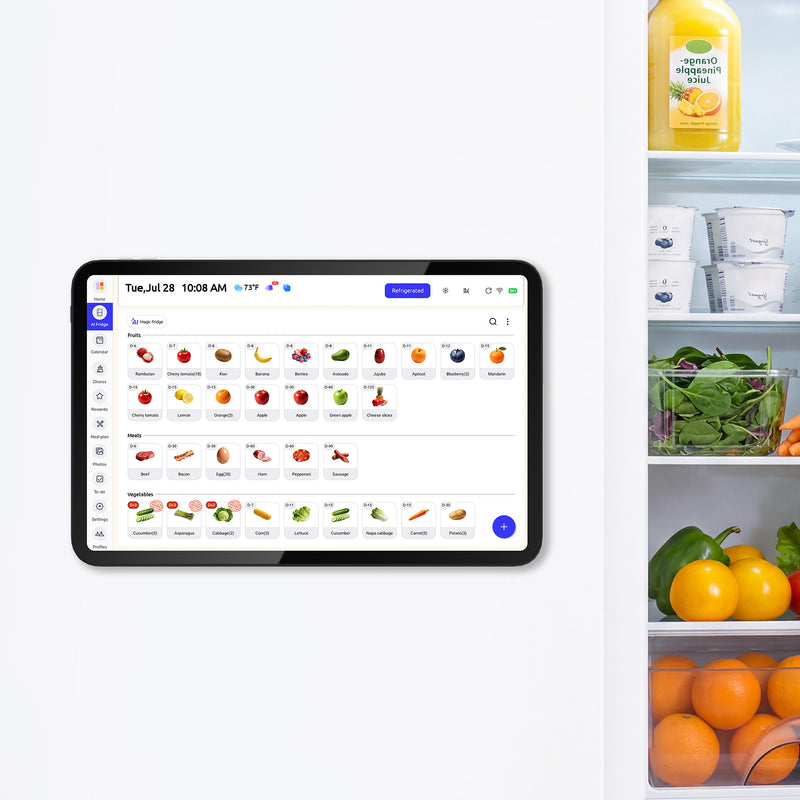
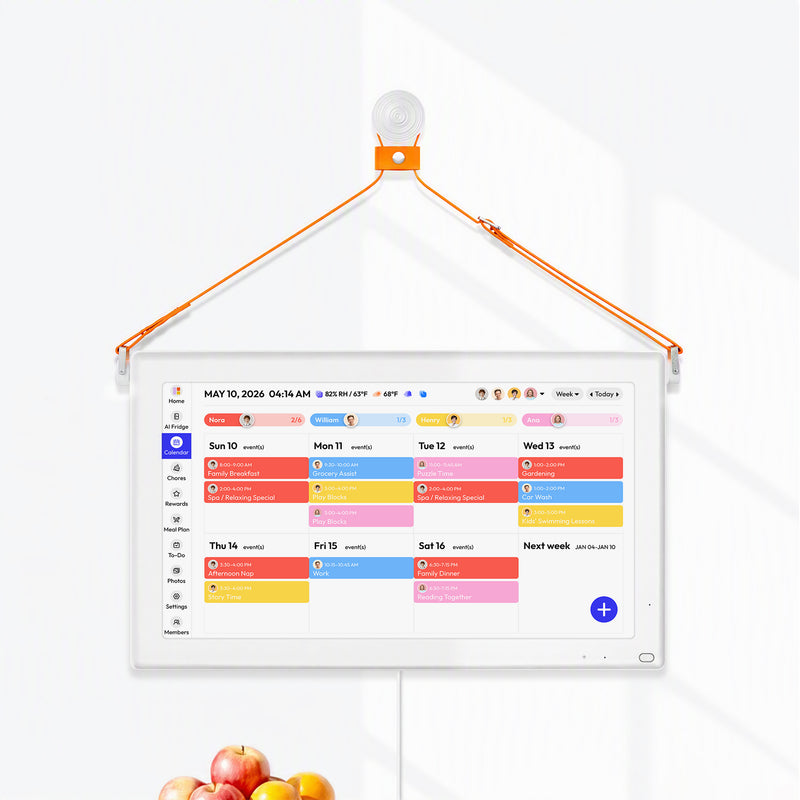
A digital family calendar can work as one gift for a whole family because several people can use the same view for schedules, chores, lists, and meals. It fits households juggling school calendars, sports, caregivers, shift work, appointments, and pickup handoffs. Children can see the plan without borrowing a parent's phone, while adults can make supported updates away from home.
Before buying, confirm where the display will live, how far away people will view it, and which calendar services the household uses. Check mobile access, list and task functions, power or charging, subscription policy, privacy, warranty, returns, and the direction of calendar sync. This guide explains how to choose a family digital calendar in more detail.
Skip it if: The family already maintains a simple system, has no shared display location, dislikes visible screens, or won't complete the initial setup. A calendar cannot make people enter accurate information or share responsibility.
Choose FridgeCal for a Kitchen-First Household
The Everblog 13.4-inch FridgeCal is designed for families that already use the refrigerator as an information hub. Its current U.S. page lists a 13.4-inch touchscreen, magnetic and rechargeable design, auto-sync with Google, Outlook, Apple, TeamSnap, Cozi, and Yahoo, mobile access, chores, lists, meal planning, food-management tools, and no subscription for core features.
The compact size supports close kitchen use and flexible placement. The tradeoff is a smaller shared view than HomeCal and periodic charging, with battery performance depending on use and settings. Confirm that the refrigerator surface or included mounting solution suits the home.

Choose HomeCal for a Larger Shared Home View
The Everblog 21.5-inch HomeCal offers a larger powered touchscreen for a kitchen wall, entry, family room, or countertop. Everblog currently lists calendar syncing, color coding, chores and rewards, meals, lists, mobile access, and no subscription for core features.
The larger screen is easier to scan from farther away. It also needs more physical space, a suitable power location, and an approved mounting or stand plan. Readers who want the calendar-only gift case can explore why a family wall calendar works as a Christmas tech gift.

2.A Robot Vacuum or Vacuum-Mop for Recurring Floor Care
This category fits homes with daily crumbs, pet hair, hard floors, or frequent maintenance cleaning. Scheduling routine passes can reduce one repetitive task, but the machine won't replace deep cleaning, stairs, spot treatment, or picking up cords and toys.
Match the device to the floor plan. Check carpet and hard-floor performance, thresholds, stair detection, mapping, obstacle avoidance, pet-waste safeguards, dock dimensions, noise, replacement brushes, bags, filters, and mop supplies. Find out whether core controls work without a paid plan and how the company stores maps or camera data.
Also price the maintenance year, not just the machine. A lower purchase price may lose its advantage if proprietary consumables are expensive or difficult to find.
Skip it if: Someone must clear every room before each run, the layout has many steps or high thresholds, the family rejects indoor mapping, or nobody will clean brushes and sensors. A neglected robot becomes floor clutter.
3.A Smart Speaker or Smart Display for Shared Reminders and Audio
A smart speaker or display works best for a household already using a compatible voice assistant, music service, calendar, and smart-home platform. Shared uses include kitchen timers, music, weather, calls, simple reminders, and voice control for approved devices.
Choose the ecosystem first. Apple, Amazon, and Google products interact differently with phones, accounts, calendars, and home devices. Review household profiles, child controls, microphone mute, camera shutters, advertising, purchase permissions, and required subscriptions. Decide whether guests can trigger actions and whether children can access explicit or paid content.
A smart display isn't the same as a dedicated family calendar. It may show events and reminders, but its primary job is broader voice, media, and smart-home access.
Skip it if: The family is uncomfortable with an always-listening microphone, doesn't use the ecosystem, or expects the device to replace a full planning system. Privacy discomfort will outweigh convenience.
4.A Digital Photo Frame for Families Who Share Memories Across Homes
A digital photo frame offers emotional rather than operational value. It can suit grandparents, extended families, military households, or relatives who live far apart. The strongest feature isn't screen resolution alone. It is the ease with which approved contributors can add photos remotely.
Check display quality, viewing angles, storage, offline behavior, app support, contributor limits, captions, orientation, and album privacy. Confirm whether uploads, cloud storage, or video require a subscription. The recipient should be able to remove images and control who contributes.
Set up the frame with permission, invite only known contributors, and preload a small, well-chosen album if the recipient wants that. A flood of unmoderated uploads makes the gift harder to manage.
Skip it if: Relatives won't contribute, the recipient doesn't want another display, or the service's privacy and subscription terms don't fit. A family calendar with a photo mode may be enough when scheduling is the primary need.
5.A Smart Cooking Appliance for Faster Weeknight Meals
Multicookers, air fryers, connected ovens, and similar appliances can be practical tech gifts when they fit food the household already cooks. Repeatable value comes from predictable timing, batch cooking, presets, or less hands-on attention, not from an app badge.
Start with capacity, counter space, cooking performance, safety certification, and cleaning. Then check app dependency, Wi-Fi requirements, recipe subscriptions, replacement parts, and whether essential controls still work on the appliance itself. A family of six and a couple need different capacities even when they cook the same meal.
An appliance helps most when it supports weekly meal planning for busy families, such as a repeatable soup night or sheet-pan routine. Technology can't compensate for an unrealistic menu.
Skip it if: It duplicates a working appliance, doesn't hold enough food, or creates more washing and storage work than the current method. Ask before claiming permanent counter space.
6.A Family Gaming or Screen-Free Audio System for Time Together
Shared entertainment belongs on a practical list because family life isn't only chores. Active or cooperative gaming can support play across ages, while screen-free audio players can make stories and music easier for younger children to choose independently.
Match the system to children's ages, available room, content interests, accessibility needs, and parental controls. Calculate the cost of controllers, headphones, cases, memory, multiplayer access, games, audio cards, or subscriptions. Check whether two or more people can participate without buying a second round of equipment.
Set expectations before gifting. Decide where the device lives, when it can be used, and who manages content purchases. For screen-free audio, look at durability and whether the library can grow at a reasonable cost.
Skip it if: The device is likely to become one child's personal possession, age ratings don't fit the household, or ongoing content spending hasn't been discussed.
7.A Smart-Home Starter Kit for a Specific Daily Routine
The safest way to choose among smart home gifts is to start with one routine. Entry lights that turn on at dusk, bedroom lights that dim at a set time, or energy monitoring for a specific appliance creates a clearer use case than a mixed box of devices.
Platform compatibility matters more than device count. Confirm the household's preferred ecosystem, hub requirements, Wi-Fi or Thread support, account ownership, security-update policy, renter restrictions, electrical compatibility, and manual fallback. Devices that affect door locks, heating, wiring, or security deserve explicit recipient approval and, where appropriate, qualified installation.
Keep the first automation simple enough to explain in one sentence. The family should also know how to turn it off manually.
Skip it if: Installation is permanent, the home is rented without approval, the kit locks the family into an unwanted platform, or the giver would need access to private accounts.
Match the Gift to the Family's Biggest Repeated Friction
|
If the family often struggles with... |
Start with... |
Confirm before buying |
|
Conflicting schedules and pickups |
Digital family calendar |
Calendars, sync behavior, placement, participation |
|
Daily crumbs or pet hair |
Robot vacuum |
Floor plan, obstacles, pets, consumables |
|
Timers, audio, and simple controls |
Smart speaker or display |
Ecosystem, profiles, microphones, subscriptions |
|
Sharing photos across homes |
Digital photo frame |
Contributors, storage, privacy, app support |
|
Weeknight meal preparation |
Smart cooking appliance |
Capacity, cleaning, counter space, core controls |
|
Shared play or story time |
Gaming or audio system |
Ages, multiplayer, content costs, controls |
|
One repeatable home routine |
Smart-home starter kit |
Platform, installation, security, manual fallback |
If the family's main issue is scattered information, it may help to build a family command center that fits the household before choosing hardware. Buy the tool that fits an existing behavior, not the one with the longest feature list.
Before You Buy: Six Questions That Prevent a Bad Tech Gift
- Will more than one person use it?Name the people and the routine. “The family” is too vague.
- Does it work with their existing technology?Confirm phones, calendars, Wi-Fi, smart-home platform, accounts, and required apps.
- Is a subscription required for the feature that makes it useful?Check content, storage, automation, and premium tools.
- Who will maintain it?Include installation, charging, cleaning, updates, consumables, and troubleshooting.
- What data does it collect?Review voice, camera, location, floor mapping, children's information, and calendar access.
- Can the recipient return it?Verify the current return window, warranty, restocking terms, and gift-receipt process.
Ask before buying anything that requires drilling, account access, indoor mapping, cameras, microphones, or substantial counter space. Offer setup help, but let the recipient enter passwords and approve permissions.
FAQs About Tech Gifts for Families
What Is a Good Tech Gift for the Whole Family?
A good shared gift supports a routine several household members already have. A digital family calendar, robot vacuum, photo frame, shared audio system, or focused smart-home device can fit, depending on the family.
What Are Useful Tech Gifts for Busy Parents?
Prioritize tools that address repeated coordination, cleaning, cooking, or reminder work without creating a large setup burden. Confirm who will maintain the device and whether it adds ongoing costs.
Is a Digital Family Calendar a Good Holiday Gift?
It can be a strong fit for households managing several schedules and shared tasks. It is less suitable when the family already likes its current system, doesn't want another screen, or lacks a useful display location.
How Much Should I Spend on a Family Tech Gift?
Set the budget after identifying the problem. Include subscriptions, accessories, installation, content, consumables, and replacement parts in the total. A lower-priced product isn't cheaper if its useful feature requires years of fees.
How Do I Avoid Buying a Gadget the Family Won't Use?
Match the gift to an existing habit, confirm compatibility, ask who will maintain it, and keep a valid gift receipt. If the family can't describe when and where they would use it, pause the purchase.
The strongest family tech gift has a clear job, an agreed home, and a maintenance owner. Use those three tests before comparing brands or holiday discounts.


