


A digital calendar planner is a shared schedule system that keeps family events, reminders, tasks, and sometimes meal planning in one place. In a busy home, it works by pulling information from the calendars you already use, showing it in a format everyone can check quickly, and making updates visible to the whole household.
That is the plain-English version. Instead of one parent carrying the whole schedule in their head, a digital planner turns school pickups, dentist appointments, dinner plans, and chore reminders into something the whole family can see and act on.
What a digital calendar planner actually is
At its core, a digital calendar planner is a calendar plus a few household tools layered on top of it. The basic job is simple: show who needs to be where, and when.
In real family use, that often means:
- shared calendars for each person
- color coding for quick scanning
- reminders for time-sensitive events
- recurring tasks like trash night or soccer practice
- chore lists or to-dos
- meal ideas, grocery notes, or shopping lists
Some planners live only on phones. Some are designed for tablets or wall displays in the kitchen, hallway, or mudroom. Some are built specifically for the fridge so they sit where grocery decisions and dinner planning already happen.

How it works behind the scenes
Most digital calendar planners do not ask a family to start over from scratch. They usually connect to calendars people already use.
For example, Google supports both direct calendar sharing and a shared Family calendar for households in a Google family group. Apple handles this a little differently: Family Sharing manages the family group, while shared iCloud calendars handle the actual calendar collaboration. Outlook also supports shared calendars, though some work or school accounts may limit sharing based on organization settings.
In practice, the setup usually looks like this:
- Each adult connects the calendar service they already use.
- The planner imports those events into one combined household view.
- Each person gets a color, section, or label.
- The family adds shared items like school events, meal plans, chores, and shopping reminders.
- Any update made on a phone or computer syncs back to the shared display or app.
When people say a planner “syncs,” they usually mean the same event updates in more than one place. If a practice time changes on your phone, it should also change on the shared family screen without anyone rewriting it by hand.
Why families use one
The main benefit is visibility. A paper calendar can work, but it depends on someone remembering to rewrite changes. A phone calendar is accurate, but it is often invisible to everyone except the person holding the phone.
A digital planner sits in the middle. It keeps the speed of digital updates but makes the information visible in family space. That matters on ordinary days, not just chaotic ones.
A typical weekday example looks like this:
Mom adds an early pickup. Dad gets a work meeting moved to 5:30 PM. One child has library books due. Another has practice across town. Dinner needs to happen before 6:00 PM, not after. A good shared planner turns that from four separate mental notes into one readable plan.

Common terms, translated into normal language
Shared family calendar
This just means more than one person can see or manage the same calendar. Depending on the service, family members may have view-only access or permission to edit events. Google, Apple, and Outlook all support some form of shared access through their calendar tools.
Family command center
This is not a technical standard. It is a household term for one visible spot where the family checks plans, notices, lists, and routines. A digital calendar planner often becomes the command center if it is mounted where people naturally pass by.
Smart display
In this context, a smart display is a screen that can show calendar information, reminders, and other home-planning tools. The important question is not whether it sounds high-tech. It is whether the screen is easy to check while packing lunches, walking in the door, or answering the usual “What’s happening today?” question.
Touchscreen planning hub
This usually means a shared display you can tap to add or check events, tasks, or lists. It is a more marketing-heavy phrase, but the practical meaning is simple: a family planner that lives in a shared physical spot, not just inside an app.
The three main setups families choose
1. Phone-first calendar apps
This is the lightest option. Everyone keeps using their own devices, and the family shares one or more calendars.
This works well if everyone already checks their phone and the household does not need a visible home display. It is often enough for smaller families or families with older kids who manage their own devices.
The downside is that visibility is low. If one person forgets to look, the system breaks down fast.
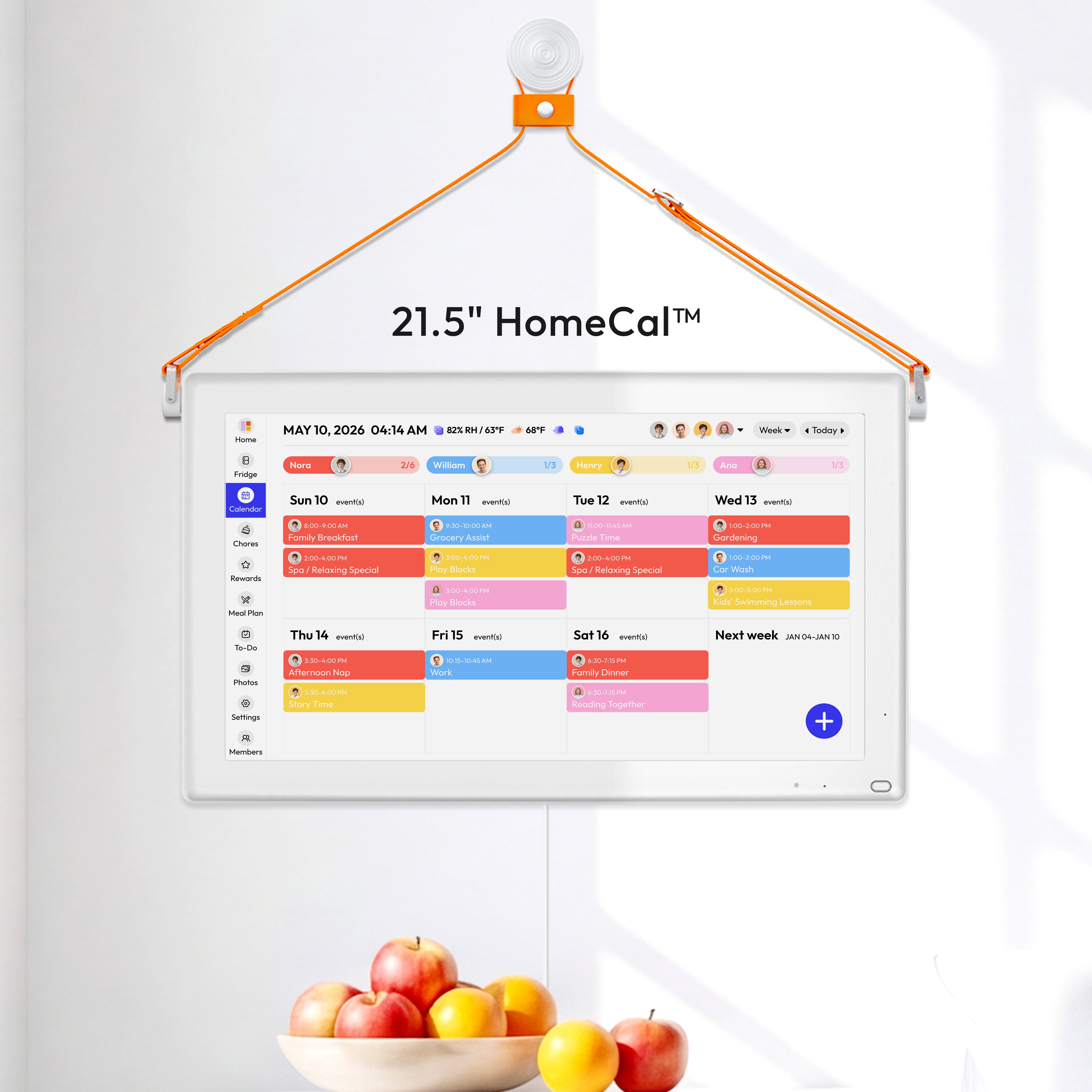
2. Shared wall calendar display
This setup puts the schedule where everyone can see it. It is useful for families who want one big weekly view in a kitchen, hallway, or living area.
For families merging multiple calendars, a tool like the Everblog 21.5" Digital Calendar is one example of a large wall-mounted planning hub. Its product and feature pages describe a shared touchscreen designed to show calendars, chores, and tasks in one place, with sync support across common calendar services including Google, Outlook, Apple Calendar, Cozi, and Yahoo through the broader Everblog calendar platform.

This type of setup is usually best when the biggest problem is missed information, not lack of apps.
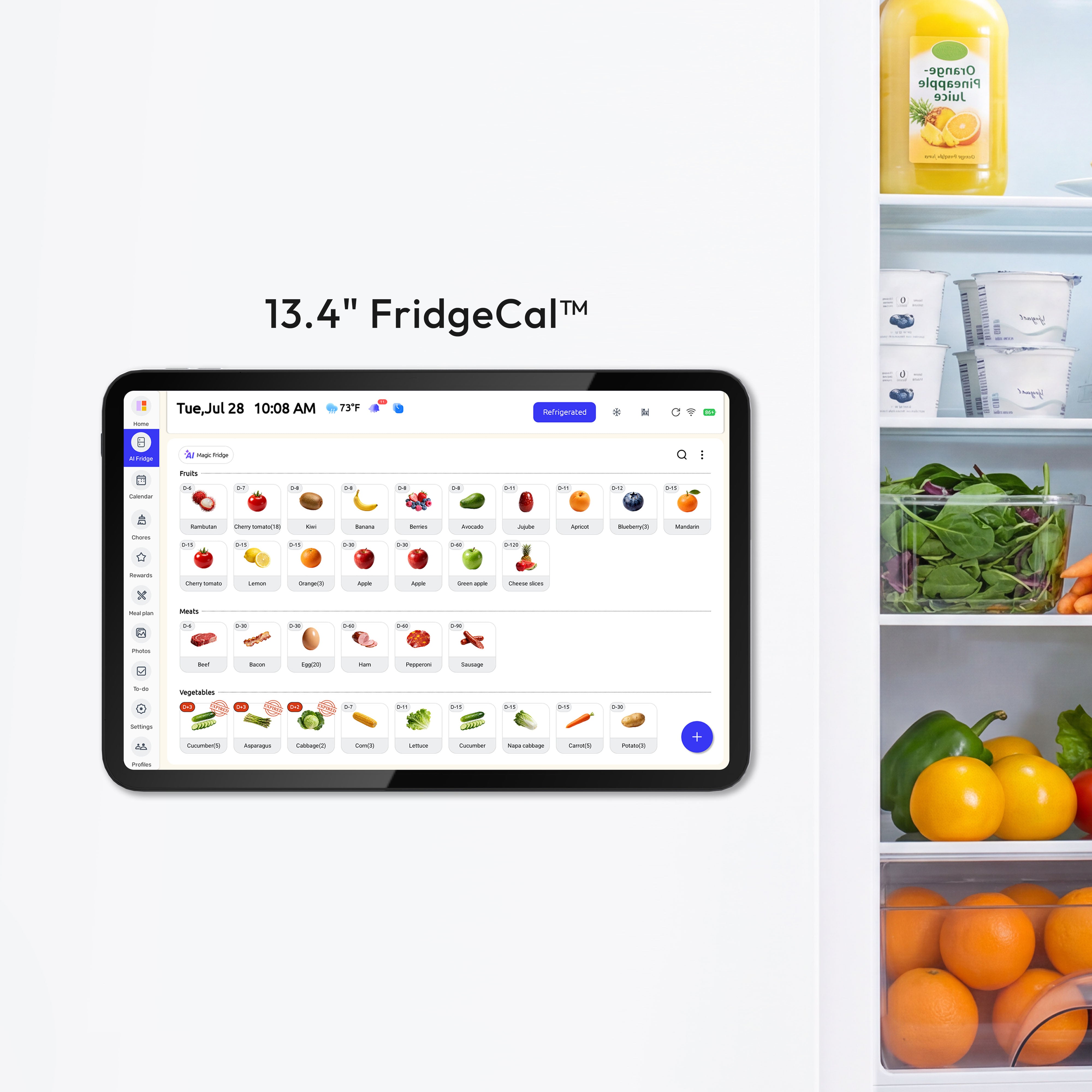
3. Fridge-mounted planner
This setup is more kitchen-centered. It is less about a big household overview and more about quick daily decisions: what is for dinner, what needs to be bought, what is expiring soon, and what time everyone gets home.
A fridge-mounted option like the Everblog 13.4" FridgeCal Calendar fits that narrower role. Its product page focuses on fridge management, expiration reminders, meal planning, and shopping-list style updates at the point where those decisions happen.
This type of planner makes the most sense when meal coordination is just as important as calendar coordination.
What matters more than marketing language
When families shop for a digital calendar planner, a few details matter a lot more than flashy feature lists.
Calendar compatibility
If the planner does not work with the calendars your family already uses, setup becomes annoying fast. Good compatibility matters more than fancy extras.
One practical detail: Google notes that calendar sharing cannot be set up from the Google Calendar app on iPhone or iPad; that part has to be done in a web browser. Small setup limits like this matter more than most product pages admit.
Permission control
Shared calendar permissions are not all-or-nothing: one person may only see free/busy time, another may see event details, and a trusted adult may be allowed to add or edit events. In family use, that usually means giving children or helpers the least access they need, keeping medical or money-related items on a separate calendar, and using private visibility for sensitive events when the platform supports it.
Some families want everyone to edit everything. Others want older kids to see plans without changing them. A useful planner should work with the permission settings already offered by the calendar service underneath it.
Readability from across the room
A family planner is not very useful if it only works from 12 inches away. For shared-home use, readable layout usually matters more than raw screen specs.
Fast entry
If adding an event takes too many taps, people stop doing it. The best system is the one people will actually update while standing in the kitchen or waiting in the car line.
Shared tasks, not just events
Many family bottlenecks are not appointments. They are reminders like “bring cupcakes,” “switch laundry,” “pay the field trip bill,” or “clean out the lunch boxes.” A planner that handles both events and tasks is often more useful than a calendar alone.
Meal and grocery support
This is not essential for every home, but it matters in homes where dinner planning and schedule planning collide every day. If everyone is getting home late on Thursday, the meal plan needs to reflect that.
- Check account type before setup. If a calendar belongs to work or school, sharing may be limited by an admin, so a separate personal household calendar is often the cleanest shared layer sharing limits.
- Use the lightest fallback that still keeps everyone informed. In Outlook, a subscribed calendar refreshes when the source changes, while an imported .ics file is a static copy.
- Run one test before relying on it for the week: create a shared event, change the time on one device, and confirm the update appears in the family view and on the screens people actually check.
What a digital planner does not solve on its own
A digital calendar planner helps with visibility. It does not automatically fix unclear responsibilities, overbooked schedules, or poor communication.
If a family never agrees on who adds school events, who updates sports changes, or who checks the meal plan, the tool can still become messy. The planner works best when the household sets a few simple rules, such as:
- shared events go on the calendar immediately
- one color belongs to one person
- recurring chores are entered once and reused
- dinner plans are updated before the week starts
- the screen or app is checked at the same time each day
That is usually enough. Families do not need a perfect system. They need a visible one that is easy to maintain.
Who benefits most from one
A digital calendar planner is most useful in homes where at least two people manage schedules, rides, meals, or household tasks across the same week.
That often includes:
- families with school-age kids
- households blending work calendars and school calendars
- co-parents coordinating pickups and transitions
- families trying to make chores more visible
- households that want meal planning tied to the real weekly schedule
If the home already runs smoothly from a shared phone calendar, a dedicated display may be unnecessary. But if the same questions keep coming up, the issue is usually not lack of information. It is lack of shared visibility.
FAQ
Q: Is a digital calendar planner the same as a smart display?
A: Not exactly. A digital calendar planner is the planning system itself. A smart display is one possible screen for showing that system in a shared space.
Q: Do all family members need to use the same calendar service?
A: Not always. Many planners are valuable because they combine calendars from different services into one shared view, though the exact options depend on the planner you choose.
Q: Is a wall-mounted planner better than a fridge-mounted one?
A: It depends on what the home struggles with most. A wall display is usually better for a broad family overview, while a fridge-mounted planner is often better for kitchen decisions like meals, grocery reminders, and food tracking.
References
- Google For Families: Use a family calendar on Google
- Google Calendar Help: Share your calendar
- Apple Support: How Family Sharing works
- Apple Support: Share a calendar on iCloud.com
- Microsoft Support: Share your calendar in Outlook
- Everblog calendar feature page
- Everblog 21.5" Digital Calendar product page
- Everblog 13.4" FridgeCal Calendar product page


