
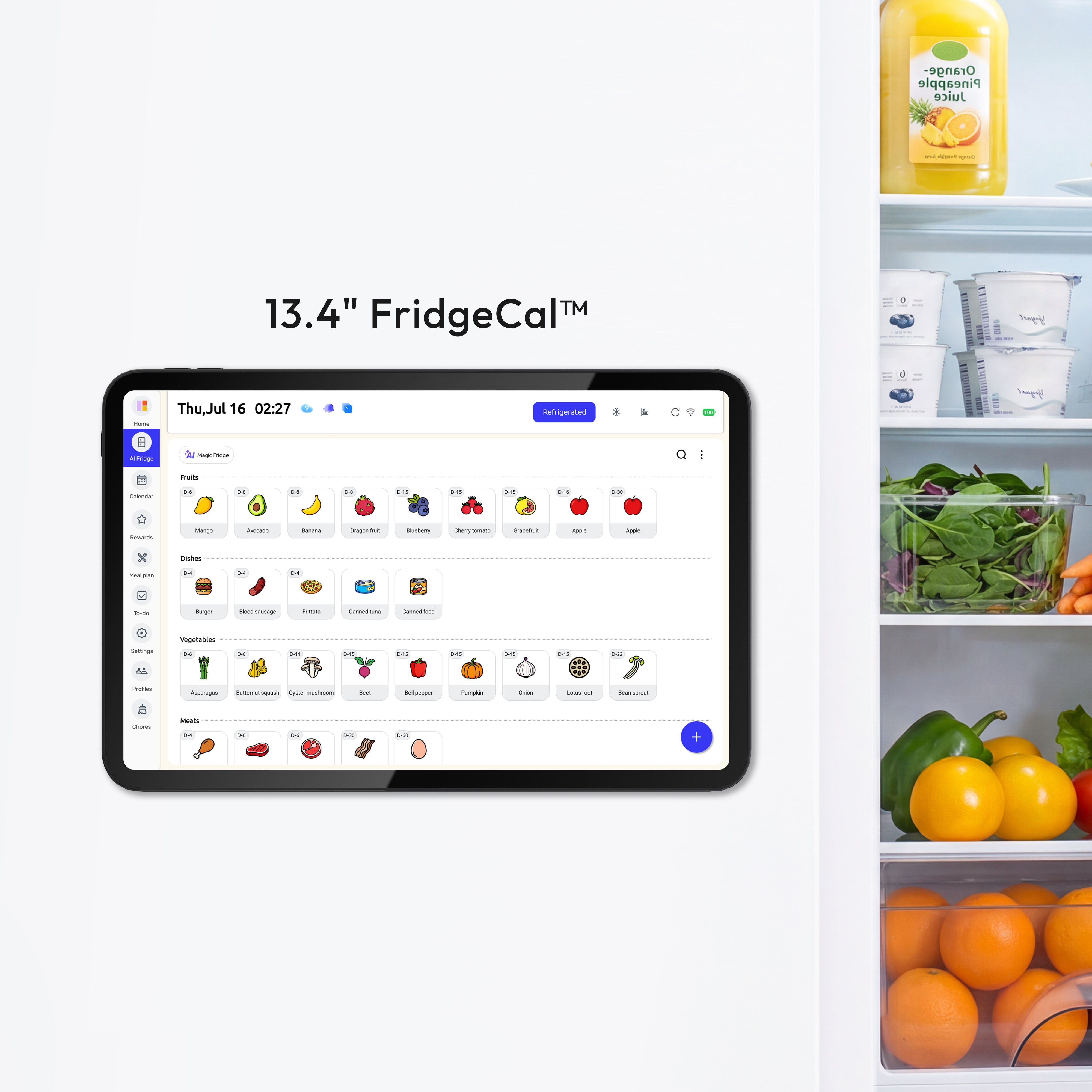
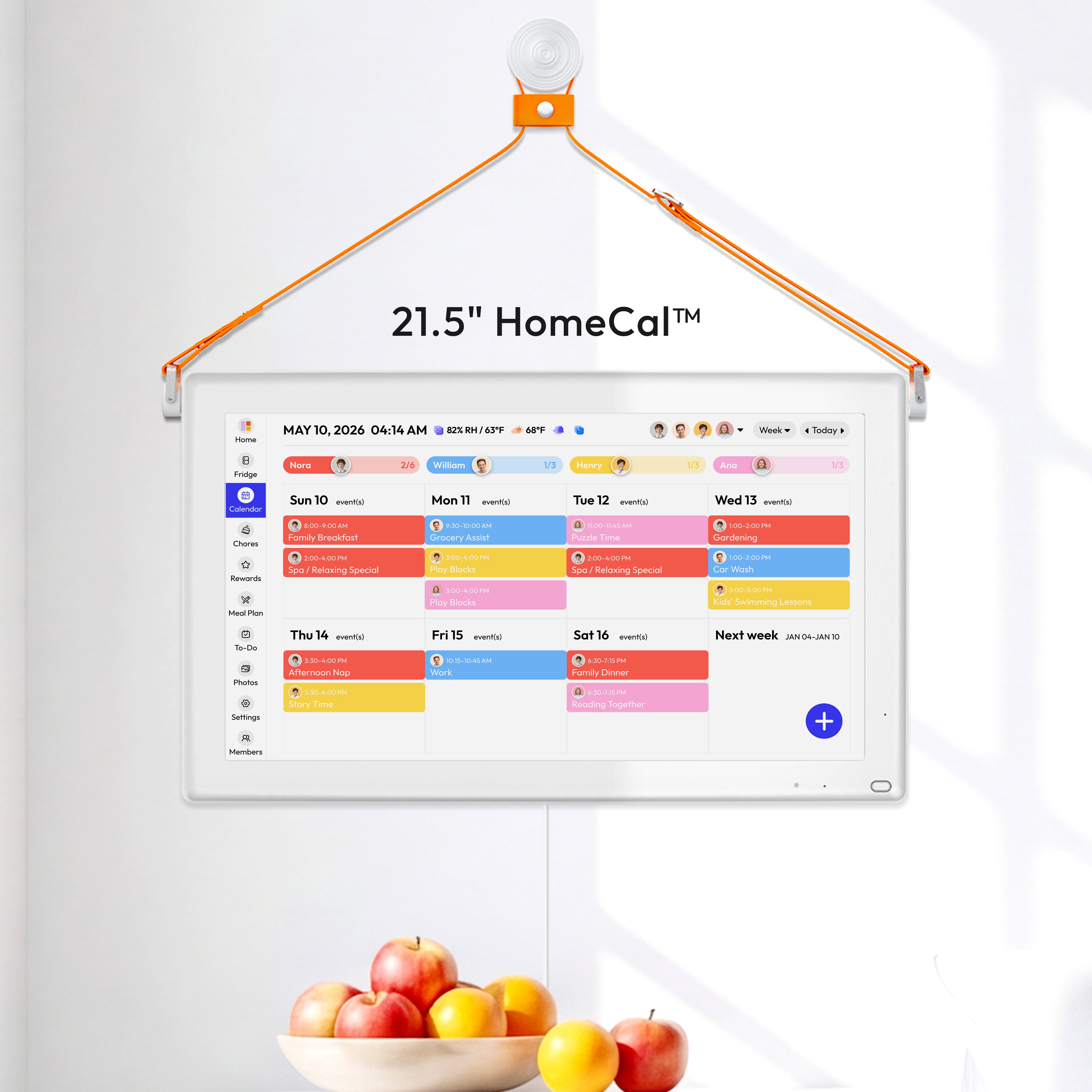

A smart fridge calendar puts your entire family's schedule on one screen, right where everyone can see it. It syncs with Google and Outlook, tracks chores, plans meals, and manages food inventory — all from a touchscreen mounted on your fridge. For busy moms carrying the mental load of family logistics, it replaces scattered apps and sticky notes with a single shared hub.
How a Smart Fridge Calendar Makes Daily Scheduling Easier
Most families juggle phone apps, paper planners, and group texts — but only one person, usually mom, actually tracks everything. A smart fridge calendar fixes this by putting the family schedule somewhere everyone passes every day.
Morning Routines: School, Work, and Activities in One View
No more juggling three apps before 8am. A smart fridge calendar pulls everything into one screen so your morning runs on autopilot:
- Calendar auto-sync pulls events from Google or Outlook automatically
- Member color coding assigns each person a unique color — see who has what at a glance
- Day, week, and month views let you zoom in on today or plan ahead
One glance at the fridge, and everyone knows what the day looks like.
After-School Coordination Without Constant Texting
Pickups, practice times, last-minute plan changes — this is where family schedules fall apart. When plans shift mid-afternoon, updates sync instantly to the fridge screen and the companion phone app. Grandparents, babysitters, and co-parents can all check the latest without a single text from you.
Getting Kids to Do Chores Without Nagging
The right system makes kids want to participate:
- An interactive chore chart lets kids check off tasks themselves — ownership replaces resistance
- A rewards system tracks progress with goals, gifts, and animated emojis
- Chores become a routine kids control, not a demand imposed on them
When kids can see their own progress, nagging turns into accountability.
Ending the Nightly "What's for Dinner?" Problem
A built-in meal planner takes this question off your plate for the whole week:
- Map out every dinner in advance — no 5pm blank-screen panic
- AI recipe suggestions from 8,000+ ingredient combinations, with calorie info
- Step-by-step recipes on the fridge screen, plus YouTube cooking videos while you prep
- Auto-generated grocery lists to cut last-minute store runs
Decide once at the start of the week. Then just cook.
Tracking Food to Reduce Waste and Save Money
The USDA estimates families waste 30–40% of their food supply — mostly from forgetting what's in the fridge. The smart fridge manager lets you log groceries as you unpack and sends expiration alerts before food goes bad. Use the yogurt today instead of throwing it out tomorrow.
Weekend and Event Planning Made Visible
Built-in countdown timers track birthdays, appointments, and family events so nothing sneaks up on you. Real-time weather updates help with outdoor planning. When the whole family can see what's coming, they're far more likely to pitch in with preparation.
Actual Downtime When the Screen Is Idle
When no one's using it, the screen works for you in quieter ways:
- Screensaver mode displays your favorite family photos
- Entertainment hub gives access to millions of apps — music, shows, podcasts while you cook
- Sleep mode activates automatically to preserve battery life
A family hub that knows when to step back.

How to Stay Organized as a Busy Parent
Buying a tool helps, but habits matter more. Here are four practical strategies that work alongside any family scheduling system.
1. Put Your Schedule Where Everyone Can See It
The most effective organizational change isn't a new app — it's visibility.
A schedule buried in one person's phone is a schedule only one person manages. A fridge-mounted screen changes that because it requires no action to check. Family members pass it multiple times a day and the schedule is simply there — no app to open, no friction, no one left out of the loop.
2. Use the 10-10-10 Rule to Filter What Goes on the Calendar
A cluttered calendar is as useless as no calendar. Before adding anything, ask: will this matter in 10 minutes, 10 months, or 10 years?
This framework, popularized by author Suzy Welch, helps you quickly separate what genuinely belongs on the calendar from what just feels urgent:
- ✅ Recurring soccer practice → on the calendar
- ✅ Doctor appointments, school events → on the calendar
- ❌ A reminder to reply to one email → doesn't need calendar space
Applied consistently, it keeps your shared schedule clean and readable for the whole family.
3. Delegate — Don't Just Share View Access
The mental load shrinks when more people manage the calendar, not just look at it. That means:
- Partner or co-parent — give full edit access so they can add and update events independently
- Older kids — assign age-appropriate tasks with clear ownership via the chore chart
- Caregivers and grandparents — connect them to the same system so they're never out of the loop
If only one person is updating and monitoring everything, the mental load hasn't moved — it's just been digitized.
4. Keep It Simple, Not Perfect
The most common reason family systems fail isn't lack of effort — it's overbuilding. Color-coded time blocks and detailed task lists look great on day one and collapse by week two.
A sustainable system is one you'll actually use on your worst days. Focus on:
- Recurring events and weekly rhythms (school, practices, meal plans, chores)
- Key deadlines and appointments
- A simple running list for one-off items — not the main calendar
The goal isn't a perfect system. The goal is a consistent one.
How Should Busy Moms Choose the Right Smart Fridge Calendar?
| Your Need | What to Look For | Everblog FridgeCal Feature |
| Whole family checks the schedule | Large fridge-mounted touchscreen, visible without opening an app | 13.4" FHD display, magnetic fridge mount |
| No starting from scratch | Auto-sync with existing Google or Outlook calendars | Two-way calendar sync, companion phone app |
| Kids do chores without nagging | Interactive chore chart kids control themselves | Touchscreen chore chart + rewards system |
| End the "what's for dinner?" stress | Weekly meal planner with smart recipe suggestions | AI recipes from 8,000+ combos, YouTube cooking videos |
| Less food waste, smarter shopping | Grocery tracking with expiration alerts | Smart fridge manager + expiration notifications |
| Easy install, any fridge type | Tool-free magnetic mount, works on all surfaces | 33–40 lb magnetic grip, stickers for glass doors |
| All-day battery, no babysitting | 72+ hour standby, fast charging, auto sleep mode | 8,400mAh battery, 18W fast charge, sleep mode |
1. You Want to Stop Wasting Food and Overspending at the Grocery Store.
A food inventory tracker lets you log groceries when you unpack them and see exactly what you have on hand at any time. expiration alerts notify you before items go bad, so food gets used instead of thrown out. Over time, this visibility means your shopping list reflects what you actually need — not what you think you might be out of. For families spending significant money on groceries each month, this feature alone can justify the cost of the device.
2. You Need Something That Works for Your Kitchen Setup Without a Complicated Install.
Not every fridge is the same, and your calendar mount shouldn't require a toolbox to figure out. Here's what to look for:
- A magnetic mount with 33–40 lb grip strength that stays secure through repeated fridge opening and closing
- Included magnetic sticker attachments for non-magnetic or glass-door fridges — no drilling, no tools, no damage
- Compatibility with both flat and curved fridge doors, covering 99% of fridge types on the market
- A cable-free, wireless design that keeps your counter clean and uncluttered
The best setup experience is one you barely notice — mount it, connect it, and move on.
3. You Want a Device That Lasts Through a Full Day Without Constant Charging.
With everything else you're managing, babysitting a battery shouldn't be on your list. Look for at least 8,400mAh capacity with 72+ hours of standby time so the screen stays on all week without interruption. Fast charging at 18W or above means a quick top-up when needed, and automatic sleep mode during idle periods extends battery life further without any action from you.
How Everblog FridgeCal Calendar Helps
The Everblog FridgeCal Calendar is designed with one goal: to make family life lighter. Unlike paper planners or mobile apps that only one person checks, it lives right at the heart of the home — mounted securely on your fridge, visible to everyone, and always up to date.
- Calendar Auto-Sync: Automatically pulls events from Google or Outlook, so the whole family stays aligned with no missed plans or double bookings.
- Shared Family Hub: Everyone sees the schedule — no more "What's happening today?" questions. Member color coding makes it easy to see who has what at a glance.
- Chore Chart & Rewards System: Kids can check off chores interactively and earn rewards, turning responsibilities into proud moments.
- Meal Planner & AI Recipes: No more "What's for dinner?" stress — plan the week's meals, get smart recipe suggestions from 8,000+ ingredient combinations, and watch step-by-step recipe videos from YouTube right on the fridge.
- Screensaver Mode: When not in use, it displays your favorite family photos, making it warm and personal.
With the Everblog FridgeCal Calendar, moms no longer need to be the family's memory bank. The responsibility is shared, and the mental load becomes lighter.
How to Set Up Your Smart Fridge Calendar: A Step-by-Step Guide
Step 1: Mount the Device on Your Fridge
For magnetic fridges: The calendar attaches directly using the built-in magnetic mount — 33–40 lbs of grip strength, no tools or drilling needed.
For non-magnetic or glass-door fridges:
- Peel and apply the included magnetic sticker panels to the door
- Wait for the adhesive to set, then attach the device
- Stickers work on both flat and curved surfaces, covering 99% of fridge types
Position the screen at a height adults can glance at easily and kids can tap independently.
Step 2: Connect to Wi-Fi and Sync Your Calendars
Power on and connect to your home Wi-Fi. Open calendar settings and link the Google or Outlook accounts for every family member who needs to appear on the shared display — sync is automatic from that point forward. Add partners, co-parents, or caregivers now so nothing gets missed.
Step 3: Set Up Member Profiles with Color Codes
Create a profile for each family member and assign a distinct color so events are readable at a glance. For younger children without their own accounts, create a manual profile and add their recurring events directly from the screen or companion app.
Step 4: Build Out Your Recurring Schedule
Populate the calendar with the routines that repeat every week:
- School and work schedules — start and end times for pickups and drop-offs
- Extracurricular activities — practices, lessons, and after-school commitments
- Chore assignments — assign tasks, set frequency, and activate the rewards system
- Meal plan — map out dinners using the AI recipe tool; the grocery list populates automatically
One-off appointments can be added as they come up.
Step 5: Set Up Food Inventory Tracking
The next time you unpack groceries, log each item and its expiration date in the smart fridge manager. From there:
- Expiration alerts notify you before food goes bad
- Inventory updates as you use items
- Your grocery list reflects what you actually need
Within a few weeks, you'll waste less food and make fewer last-minute store runs.
Step 6: Walk the Whole Family Through the Screen
This is the step most families skip — and the most important one. Take five minutes to walk everyone through the screen:
- Show kids how to check off chores on the touchscreen
- Walk your partner through adding events from their phone
- Let caregivers know they can check the screen or companion app for the latest schedule
This is a shared system, not just mom's calendar. When everyone uses it, the mental load gets distributed.
Step 7: Let the Device Handle the Rest
The Everblog FridgeCal Calendar largely runs itself from here. Over-the-air updates deliver new features automatically, sleep mode preserves battery during idle periods, and screensaver mode displays family photos when the screen isn't in use. Check in after the first week to adjust any recurring events, chore assignments, or meal plans — after two weeks, most families find it runs with very little maintenance.
What Mistakes Should You Avoid with a Family Scheduling System?
Even with the right tools, a few common habits can undermine your system.
- Letting only mom manage the calendar. If no one else adds or checks events, the mental load stays with one person. Everyone in the household needs to participate.
- Not syncing all family members' calendars. Leaving out a partner's or caregiver's schedule creates blind spots. Connect every relevant calendar to the shared system.
- Overloading the calendar with too many details. Logging every minor task creates noise. Focus on recurring events, key appointments, and deadlines.
The best family scheduling system isn't the most sophisticated one — it's the one everyone actually uses.
Start Simplifying Your Family's Daily Schedule Today
A smart fridge calendar works because it puts your family's schedule where everyone sees it — not buried in someone's phone. The Everblog FridgeCal Calendar combines calendar syncing, chore tracking, meal planning, and food management into one device that lives at the center of your home. For busy moms carrying the invisible weight of family logistics, it's a practical way to share the load — not just with a partner, but with kids and caregivers too. Pick the features that match your family's needs, get everyone involved, and let the screen do the remembering.
FAQ: Smart Fridge Calendar and Parenting Tips for Busy Moms
Q1: What Is a Type A, B, C, D Mom?
These are personality-based parenting styles. Type A moms are highly organized and schedule-driven. Type B moms are relaxed and spontaneous. Type C — a term popularized on TikTok by creator Ashleigh Surratt — blends structure with flexibility. Type D moms tend to be cautious and task-oriented. Most moms fall somewhere in between.
Q2: What Are the 4 Types of Borderline Mothers?
According to psychologist Christine Ann Lawson's framework, the four types are the Waif (helpless), the Hermit (fearful), the Queen (controlling), and the Witch (aggressive). These are clinical categories, not casual labels. If this topic concerns you, consult a licensed mental health professional for proper guidance.
Q3: Can a Type O Mom Have a Type A Baby?
Yes. Blood type is determined by both parents' genes. A Type O mother (genotype OO) can have a Type A baby if the father carries at least one A gene (genotype AA or AO). The baby would inherit an O gene from mom and an A gene from dad, resulting in Type A blood.
Q4: What Is the 10-10-10 Rule for Parenting?
It's a decision-making framework: before reacting, ask how this will matter in 10 minutes, 10 months, and 10 years. For parents, it helps separate daily frustrations from truly important moments. This approach, popularized by author Suzy Welch, is useful for prioritizing what deserves your time and energy.
Q5: What Is Panda Parenting?
Panda parenting is a warm, nurturing style that gives children space to explore while setting gentle boundaries. It contrasts with more controlling approaches like tiger parenting. The focus is on emotional security and building a child's independence through support rather than pressure.


